


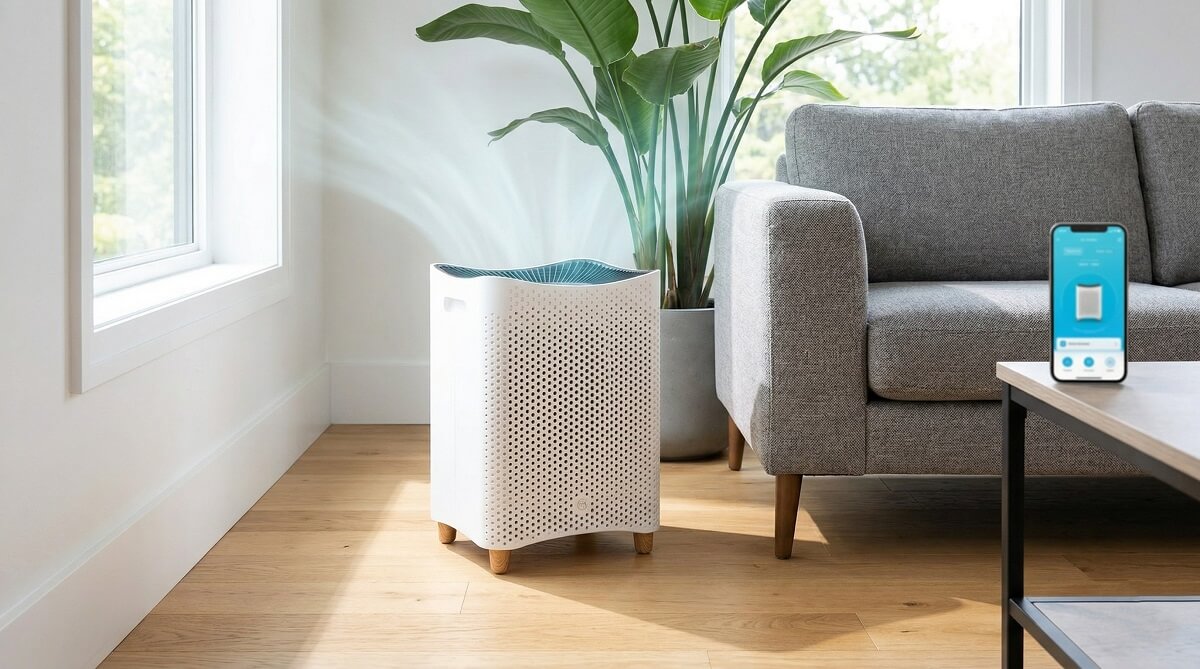
Mila is the best-looking smart air purifier you can buy right now, and the app actually earns that “smart” label. Particle removal is strong — independent tests showed AQI drop from 137 down to 8 in just 60 minutes in a bedroom-sized room. The design holds up. The app works. The filters do what Mila says.
The main gotchas: it gets legitimately loud at high speeds (73.5 dBA at max), there’s no pre-filter to extend filter life, and the older motor units had reliability issues. Newer units come with an upgraded motor that’s about 24% more efficient and reportedly more durable.
Quick take: the $349 subscription price gets you the unit plus a free first filter. After that, expect to spend roughly $120 a year on filters and about $62 on electricity. Over three years, you’re looking at around $775 total — more than double the cost of a Coway, but you’re buying a different category of product: one that tracks eight air quality parameters, integrates with Apple HomeKit, and won’t make your living room look like a hospital waiting room.
Is the Mila Air Purifier Right for You?
It’s a strong fit if you:
- Have seasonal allergies, pet dander, or live somewhere prone to wildfire smoke
- Want a unit that blends into your home rather than dominating it
- Are comfortable managing a smart device through an app
- Need coverage for a bedroom or open-plan space up to 400–1,000 sq ft (more on this range below)
- Like data — AQI trends, PM2.5 levels, CO2, humidity, all visible on your phone
Consider something else if you:
- Need Energy Star certification — only the Overreactor filter qualifies
- Want a pre-filter you can vacuum to stretch filter life
- Are replacing it every 6 months and $120 a year in filters is genuinely a stretch
- Would be just as happy with a at half the cost
- Need one unit to cover more than 1,000 sq ft effectively
What Is Mila and Who Makes It?
Mila was founded by three fathers based in Shanghai who watched their families deal with serious air pollution on a daily basis. The product they built reflects that motivation: it’s thorough in a way that most consumer air purifiers aren’t, with built-in sensors tracking eight different air quality indicators and a filter lineup designed around specific household needs rather than one-size-fits-all marketing.
The current lineup includes three hardware options: the original Mila Air (the one most reviews cover, around $349 with subscription), the newer Mila Air 3 (around $408, with some spec improvements including a 460 m³/hr CADR), and the Mila Air Mini for smaller spaces. All three run on the same app and use the same family of seven filters — which is both Mila’s biggest strength and the part that confuses most buyers. More on the below.
What makes the “filter-as-the-product” model smart is that it lets you change your needs over time. Bought the unit for general air quality, then got a cat? Swap in the Critter Cuddler on your next delivery. Having a baby? The Mama-to-Be H14 HEPA handles ultrafine particulates at a level most purifiers don’t reach. You don’t have to buy a new machine — just a different filter.
Design and Build Quality
Most air purifiers look like something from a doctor’s office supply closet. Mila doesn’t. The white perforated exterior, natural wood legs, and circular top touchscreen are designed to pass as furniture, and they pull it off. It’s available in black as well if you prefer that look.
The dimensions are 12 × 12 × 15 inches, and it weighs in at 13–18 pounds depending on which filter is installed (the heavier carbon filters add meaningful weight). Air draws in through perforations along the bottom sides, passes through the filter, and exits clean through fan grilles on top.
The on-unit touchscreen is about the size of a coaster — three buttons and a basic AQI display. By design, it’s minimal. Mila wants you in the app, and the app is genuinely where the experience lives. The touchscreen tells you your current mode and whether to open or close windows. That’s about it.
After a year in real living rooms and bedrooms, the design holds. The wood legs don’t feel like an afterthought. Reviewers with 9 months and 12 months of daily use consistently say it’s the one appliance in their home that gets compliments rather than questions about where to hide it.
Setup — What to Expect
Getting it running takes under 10 minutes. Unbox, snap off the front door, slide out the filter, remove the plastic wrap, pop it back in, plug it in. The unit immediately starts calibrating — you’ll hear the fan ramp up and down. That’s normal. It’s learning the room.
Then download the Mila app, create an account, and answer a short set of diagnostic questions: Do you have pets? How many people share the space? Urban or rural? Which smart modes do you want active? The answers help Mila configure its auto behavior before you’ve touched anything manually.
Pairing happens over 2.4 GHz Wi-Fi. If your network is 5 GHz only, you’ll need to temporarily enable 2.4 GHz during setup. It also works offline if your Wi-Fi is unavailable, though you lose the app-controlled features. Total setup time from box to running: roughly 8 minutes.
The App: 9 Smart Modes and What They Actually Do
This is what you’re really paying for on top of the hardware. The app tracks eight parameters in real time: PM1, PM2.5, PM10, VOCs (volatile organic compounds), CO2, CO, humidity, and temperature. You get current readings, historical graphs by hour/day/week/month, and monthly home health reports that compare your indoor air to neighborhood outdoor averages.
You can run Mila in auto mode — it sets its own fan speed based on live AQI and targets a goal you define — or manual mode, where you drag a slider to choose the speed. Most people end up on auto most of the time.
The nine smart modes are worth walking through, because this is where the product earns its “intelligent” reputation:
- Bedtime Schedule — sets quiet hours so the fan won’t blast in the middle of the night
- Bubble Boy — maximum cleaning at whatever noise level it takes; good after a deep fry session or when AQI spikes from neighbors grilling
- Child Lock — disables on-unit controls so kids can’t adjust settings
- Energy Save — shuts off the fan and screen when AQI hits zero, waking when levels rise
- Housekeeping Service — runs at high speed only when the motion sensor detects the room is empty; deep cleans without disturbing you
- Quiet Mode — drops fan speed when occupancy is detected in the room
- Sleep Mode — dims the panel lights, smooths out fan fluctuations, and lets you set your sensitivity from “light sleeper” to “practically dead”
- Turndown Service — kicks on one hour before your set bedtime for a deep pre-sleep clean
- White Noise Mode — gentle fan undulations to help with sleep; it works
Multiple units can be managed from one app account. You can mute “beeps and bloops” on the unit itself — useful if it’s in a kid’s room. And as of the Mila Air 3, it connects to Apple HomeKit, Amazon Alexa, and Google Home.
One honest note: the amount of data the app surfaces can feel like too much if you just want clean air. Eight sensor graphs with color-coded alerts is comprehensive, but also occasionally overwhelming. The AQI number alone tells you 90% of what you need to know day-to-day. The deeper data is there when you want it — and genuinely useful when you’re tracking why your air got bad at 6pm every evening (in most cases: cooking).
The 7 Filters — How to Choose the Right One
This is where Mila gets confusing for first-time buyers, and it’s where most reviews fall short. They list all seven filters and leave you to figure it out. Here’s a more direct take.
First, the full breakdown:
| Filter | HEPA Grade | Efficiency | Carbon | CADR (m³/h) | Price | Best For |
|---|---|---|---|---|---|---|
| The Basic Breather | H12 | 99.6% | None | 460 | $69 | Large rooms, general air quality |
| The Big Sneeze | H13 | 99.97% | None | 412 | $79 | Allergies — pollen, dust, pet dander |
| The Rookie Parent | H12 | 99.6% | 0.70 lb | 386 | $79 | Nurseries and smaller living rooms |
| The Critter Cuddler | H13 | 99.97% | 0.84 lb | 350 | $89 | Pets — fur, dander, ammonia odors |
| The Home Wrecker | H12 | 99.6% | 1.96 lb | 300 | $89 | New furniture, renovation, VOC off-gassing |
| The Mama-to-Be | H14 | 99.995% | 0.70 lb | 245 | $89 | Pregnancy — ultrafine particles + VOCs |
| The Overreactor | H14 | 99.995% | 1.25 lb | 254 | $109 | Maximum filtration, formaldehyde (Energy Star) |
Notice that CADR drops as filters get heavier — more carbon and finer HEPA mesh means slightly less airflow. That tradeoff is worth it when you need the extra filtration, but it matters for room sizing.
Here’s a quick decision guide:
- Allergies only → The Big Sneeze (H13, no carbon, max CADR for allergy use)
- Pets → The Critter Cuddler (H13 + carbon, handles ammonia from litter boxes)
- New home / renovating → The Home Wrecker (most carbon at 1.96 lb, targets off-gassing from floors and paint)
- Baby on the way → The Mama-to-Be (H14 + carbon, ultrafine particulate protection)
- Wildfire smoke or large room → The Basic Breather (highest CADR at 460 m³/h, covers the most ground)
- Maximum everything → The Overreactor (H14, formaldehyde targeting, only Energy Star-certified option)
One thing to be clear on: Mila’s marketing says “1,000 sq ft coverage,” but that’s the maximum — not optimal — coverage number. At AHAM’s recommended 5 air changes per hour, the Basic Breather covers about 406 sq ft optimally. For wildfire smoke specifically, AHAM recommends your smoke CADR match the room’s square footage — meaning the Basic Breather’s ~271 CFM (converted from 460 m³/h) handles rooms of around 270 sq ft. For a larger space, you’d want two units or the Mila Air 3.
Performance: Does It Actually Clean the Air?
Short answer: yes, measurably and consistently. Independent tests using a Temtop LKC-1000S laser particle meter showed the Mila reduced PM2.5 from 137 µg/m³ down to 8 µg/m³ in a 194-sq-ft room within 60 minutes at max speed — a 94% improvement in air quality.
In a 320-sq-ft room (larger than the filter’s recommended coverage), it still hit 92% improvement over the same 60-minute run. Strong results for a room that exceeded the rated size.
Real-world testers back this up. After a year of daily bedroom use, one reviewer reported her allergy symptoms — stuffed nose, itchy eyes, constant sneezing — had “drastically improved” without any other changes to her routine. Another reviewer pulled the original filter after six months and found it had turned gray, visibly loaded with dust, soot, and debris that had been circulating in her NYC apartment air. That’s the kind of evidence that tells you the thing is working.
For mold specifically: the Overreactor filter cleared 98.02% of mold within 20 minutes in testing. The app also monitors humidity and will alert you if conditions in your space are approaching mold-favorable levels, independently of what the filter is doing.
Mila also claims 98.9% virus removal — relevant context for anyone putting one in a baby’s room or a home office used by someone immunocompromised.
Noise: The Honest Numbers
Most reviews summarize noise as “quiet enough” or “can get loud.” Neither is useful. Here are the actual numbers from noise-meter testing:
| Fan Speed | Noise Level (dBA) | Equivalent |
|---|---|---|
| Speed 1 (min) | 43.2 dBA | Quiet library, fine for sleep |
| Speed 3 | 53.1 dBA | Normal conversation, noticeable but not disruptive |
| Speed 5 | 61.9 dBA | Background TV volume |
| Speed 7 | 65.7 dBA | Raised conversation level |
| Speed 10 (max) | 73.5 dBA | Vacuum cleaner territory |
In practice, daily auto-mode use keeps the fan in the Speed 1–5 range most of the time. Max speed kicks in when AQI spikes — someone starts cooking, opens a window while a neighbor’s grilling, or lights a candle. In a typical bedroom setup, testers report max speed lasting around 20 minutes on the first day of setup while the unit calibrates, then rarely again unless something’s actively polluting the room.
If you’re putting this in a bedroom, Sleep Mode and Quiet Mode are genuinely helpful. Sleep Mode dims the panel lights and smooths out fan fluctuation — you set whether you’re a light sleeper or a heavy one and Mila adjusts accordingly. It’s not just a marketing feature; it changes behavior in a way you notice.
What Mila Actually Costs Over Three Years
This table is what competitors almost never build, and it changes how the price looks:
| Cost Item | Year 1 | Year 2 | Year 3 | 3-Year Total |
|---|---|---|---|---|
| Hardware (subscription price) | $349 | — | — | $349 |
| Filters (first free; then ~$120/yr) | $0 | $120 | $120 | $240 |
| Electricity (~$62/yr) | $62 | $62 | $62 | $186 |
| Total | $411 | $182 | $182 | $775 |
For reference, a Coway AP-1512HH runs about $100 upfront, roughly $50 a year in filters, and around $30 in electricity — about $280 over three years total. That’s a $495 gap over the same period.
What the Mila premium buys you: a far superior app, seven specialized filter configurations, significantly better design, smart-home integration, and 8-parameter air quality monitoring. Whether that’s worth $495 over three years depends entirely on how much those things matter to you.
One note on the subscription math: the auto-refill plan ($349 vs ~$408 one-time) saves you $59 upfront and includes the first filter free. It also extends your warranty from 2 years to 3 years, with $99 replacement coverage for up to 5 years total. If you’re keeping this unit for 3+ years, the subscription pays for itself in both money and peace of mind.
If you’re curious how other stack up, we’ve covered a range of options across different budgets.
Long-Term Reliability — What You Should Know
This is the conversation most Mila reviews avoid. Older units had a motor failure problem — there are enough threads on Reddit about Mila units dying after 1–2 years that it’s worth addressing directly. To Mila’s credit, their support team has a strong reputation for sending replacement units, sometimes more than once. But the fact that replacements were needed at all matters when you’re spending $349 on an appliance.
The good news: Mila has since upgraded the motor. The latest US and EU models run a 66.8W motor compared to the original 88W motor — about 24% more efficient and, by available reports, more durable. If you’re buying new in 2026, you’re getting the upgraded hardware.
A few other things to factor in. There’s no pre-filter on the Mila, which means the main filter (the entire filtration unit) takes the full load of every particle from day one. This is why the 6-month replacement schedule is real rather than a manufacturer upsell. A filter left in too long will lose efficiency and can start recirculating what it’s collected. Set a calendar reminder or subscribe and let the 6-month auto-ship handle it.
There’s also no filter reset indicator on the unit itself — you’ll need to track it manually or use the subscription timing as your signal. For a device this smart, that omission is genuinely odd.
Frequently Asked Questions
Does the Mila air purifier really work for allergies?
Yes. Independent particle removal tests showed a 94% AQI improvement in a bedroom-sized room within 60 minutes. Long-term users with seasonal allergies consistently report reduced symptoms — fewer stuffy mornings, less eye irritation — after several weeks of continuous use. The Big Sneeze filter (H13 HEPA) is specifically designed for allergen removal.
Which Mila filter should I start with?
For most households: The Big Sneeze if allergies are your main concern, or The Critter Cuddler if you have pets. If you’re not sure, The Big Sneeze is the safest default — strong H13 filtration, no carbon (so airflow stays high), and it covers the most common use case. You can switch on your next filter delivery if your needs change.
How often do I need to replace the Mila filter?
Every 6 months, according to Mila’s official guidance. If you run it 24/7 in a high-pollution environment (pet household, near a busy road, heavy cooking), stick to 6 months. If you’re in a clean environment and turn it off when you travel, you may stretch to 9–11 months. There’s no built-in filter reset indicator, so track it yourself or use the auto-refill subscription as your reminder.
Is the Mila air purifier loud?
At low speeds, no — 43.2 dBA at Speed 1 is quieter than a whisper and fine for sleeping. At maximum speed (73.5 dBA), it’s loud enough to compare to a vacuum cleaner. In normal auto-mode use, it rarely hits max speed. Overnight with Sleep Mode active, most users don’t notice it.
Does Mila produce ozone?
No. Mila uses mechanical HEPA filtration and activated carbon — no ionizer, no UV, no plasma, no electrostatic technology that would generate ozone.
Can I clean my Mila filter instead of replacing it?
No. Mila advises against cleaning the filter — water damages the filtration media integrity, and vacuuming the surface doesn’t clean the HEPA layers where most particles are trapped. Replace it on schedule.
What rooms is Mila best suited for?
Bedrooms and mid-sized living rooms up to about 400 sq ft at 5 air changes per hour (optimal coverage for the Basic Breather). Mila’s “1,000 sq ft” figure refers to maximum coverage — if you’re trying to clean a large open-plan space effectively, consider placing two units or choosing the Mila Air 3 for its higher CADR.
How does Mila compare to Dyson, Coway, or Levoit?
Dyson purifiers are roughly comparable in price but tend to focus on combined purification and fan functionality; the Mila’s filtration system is more specialized via its filter options, and the app is more comprehensive. Coway and Levoit offer solid filtration at significantly lower cost — roughly $100–$200 vs Mila’s $349 — and are the right choice if budget is a deciding factor. You give up the design, the app depth, and the specialized filter system, but you’re not giving up clean air.
The Bottom Line
If you’re deciding, here’s the practical path: buy through Mila’s website using the subscription price ($349), choose The Big Sneeze or Critter Cuddler based on your household situation, and let the auto-refill handle filter logistics. You get the first filter free, warranty coverage extends to 3 years, and if you want to change filter types later you can do it on your next shipment without buying new hardware.
It’s a real investment — roughly $775 over three years. Tom’s Guide rates it 3.5 out of 5, calling it “a great performer with an even better design” — which about sums it up. But it’s also the only air purifier in this category that you’ll actually want to leave in the middle of your living room.
Looking at to pair with this? We cover everything from smart home devices to kitchen gear on ChubbytIps.
