


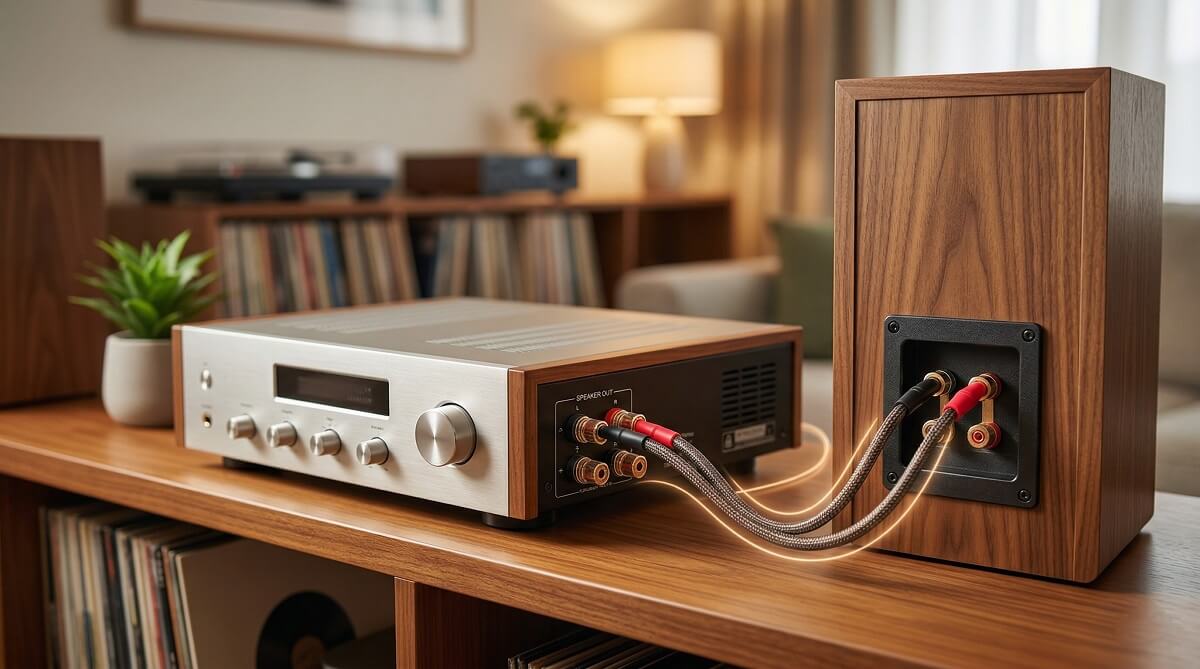
Connecting a passive speaker to an amplifier comes down to three things: matching impedance (ohms), choosing the right wire gauge, and keeping polarity consistent across both channels. Get those right, and the rest is just plugging things in. Miss one of them, and you’ll be troubleshooting buzz, distortion, or a dead channel for an hour.
Most home setups work fine with a 2-channel stereo amp, a pair of passive bookshelf speakers, and a short run of 16 AWG speaker wire. If you’re starting from scratch, a budget-friendly Class D amp like the Fosi Audio BT20A ($79.99) paired with a decent set of passive speakers covers most living rooms and offices without breaking $200 total.
This guide walks through the full process — checking speaker type, matching your amp to your speakers, running the wire, and troubleshooting if something sounds off. There’s also a comparison of the top stereo amps at each price point if you still need to pick one. See all audio guides at ChubbytIps.
Do You Actually Need a Separate Amplifier?
✅ You Need a Stereo Amp If:
- Your speakers are passive — they have only binding posts (no power cable, no volume knob)
- You’re running bookshelf or floor-standing speakers in a 2-channel setup
- You want cleaner sound than a receiver delivers at its price point
- You’re adding a stereo zone to an existing home theater system
- You have a turntable and want to run it through dedicated speakers
❌ Skip the Standalone Amp If:
- Your speakers are active/powered — they already have a built-in amp and just need a signal source
- You already own a stereo or AV receiver — it has amplification built in
- You need surround sound (5.1, 7.1) — a stereo amp only does 2 channels; get an AV receiver instead
- You want an all-in-one box — a network streaming receiver handles tuning, inputs, and amplification together
Before You Wire Anything: Two Numbers You Need to Know
Before touching a single piece of wire, check two specs on your speaker — impedance (ohms) and power handling (watts RMS). These determine which amp is safe to use and how loud your system will realistically play.
Impedance: The Ohm Rating
Speaker impedance — measured in ohms (Ω) — tells the amp how hard it has to work to push current through the speaker’s voice coil. Most home speakers run at 4Ω, 6Ω, or 8Ω. Lower impedance draws more current. A 4Ω speaker pulls roughly double the current of an 8Ω speaker from the same amplifier, which means your amp needs to be rated to handle that load.
The rule here is simple: check the minimum impedance rating on your amp and make sure your speakers are at or above it. If your amp says “4Ω minimum” and your speakers are 8Ω, you’re fine. If your amp says “8Ω minimum” and you’re running 4Ω speakers at high volume, you risk overheating the output stage. Most modern amps have thermal protection circuits that shut down before anything blows, but it’s still worth checking before purchase rather than after.
Per ELAC’s impedance matching guide, a quality amplifier “when presented with a load at a high level that it’s not happy with, should just nicely shut down and go into protection and not cause any damage” — but that’s the safety net, not the plan.
Power: Watts RMS vs Peak
Speakers have two power ratings: RMS (continuous, real-world) and peak (brief transient maximum). The number that matters is RMS. Your amp’s RMS output should be in the same neighborhood as your speaker’s RMS handling — ideally 1.5 to 2x higher than the speaker’s rating to give you clean headroom without pushing the amp into clipping at moderate volumes.
Here’s the counterintuitive part: running a small amp pushed to its limit is more dangerous to your loudspeakers than running a higher-wattage unit at moderate levels. More on amplifier power and speaker matching. When an underpowered amp clips, it pushes distorted DC current into the tweeter — and tweeters are fragile. As Axiom Audio’s Andrew Welker explains, specifications alone won’t protect you: the practical signal you send matters more than the numbers on the box.
Sensitivity: The Spec People Overlook
Speaker sensitivity (measured in dB/W/m — decibels per watt at one meter) tells you how loud a speaker plays per watt of input. A speaker rated at 90dB sensitivity needs half the wattage to reach the same volume as one rated at 87dB. If you have efficient speakers (88dB or higher), you need far less amplifier power than a low-sensitivity pair. This is why a 50W amp can fill a living room with the right speakers, while 200W might barely satisfy a hard-to-drive 84dB speaker in the same space.
What Cables and Connectors You’ll Need
The physical connection between an amp and passive speakers uses speaker wire — two-conductor copper cable carrying the amplified signal. This is different from the RCA or 3.5mm cables that connect your source (phone, turntable, TV) to the amp’s input.
Speaker Wire Gauge
Thicker wire (lower AWG number) has less resistance, which matters for longer cable runs. For most home setups under 50 feet at 75–100W, 16 AWG is the right choice — it’s flexible, affordable, and handles the load without meaningful power loss. For longer runs (50–100 feet) or high-power subwoofer applications, step up to 14 AWG. According to SoundCertified’s wire guide, using undersized wire at long distances causes resistance-related power loss and can affect frequency response at the low end.
You don’t need expensive “audiophile” speaker cables for a home setup. Standard copper zip cord (the kind sold in bulk at hardware stores) works fine. The connector type matters more than the wire brand.
Connector Options
- Bare wire: Strip the insulation, twist the strands, insert into binding post — works fine but can fray over time
- Banana plugs: Screw or crimp onto the wire end; snap cleanly into binding posts; best for amps you’ll hook up and swap out regularly
- Pin connectors (spade lugs): Flat connectors that tighten under binding post screws; secure and vibration-resistant
See audio accessories and cables at ChubbytIps.
Source-to-Amp Cables
For the connection from your source device to the amp’s inputs, you’ll use RCA cables (most common), a 3.5mm-to-RCA cable (if connecting a phone or laptop), or optical/coaxial digital cable if your amp has a DAC input. If you’re using a turntable, confirm whether your amp includes a built-in phono preamp stage — most budget amps don’t, which means you’ll need a separate phono preamp between the turntable and amp.
How to Connect Speakers to an Amplifier: Step by Step
These steps work for any stereo amp — from a $80 Fosi board to a $649 Sonos unit. More how-to guides at ChubbytIps.
Step 1 — Power Down Everything
Turn off your audio amp and source before wiring anything. Plugging speaker wire into a live amp can cause a pop or surge that damages tweeters. This takes five seconds and prevents an annoying repair call later.
Step 2 — Cut and Strip Your Speaker Wire
Measure the distance from your amp to each speaker, add a foot or two for slack, and cut. Strip about half an inch of insulation from each end of both conductors. Twist the exposed copper strands tightly so no loose strands can touch the opposite terminal (this causes a short, which the amp’s protection circuit catches — but it’s still worth avoiding).
Step 3 — Connect Wire to the Amp’s Speaker Terminals
Most amps have color-coded binding posts: red for positive (+) and black for negative (−). Loosen the binding post cap, insert your wire or banana plug, and tighten. Use the same conductor for positive across both channels — typically, speaker wire has a stripe or ridge on one side to distinguish the two.
Step 4 — Run the Wire to Each Speaker
Keep the same polarity at the speaker end: the wire connected to the amp’s positive terminal connects to the speaker’s positive terminal (usually red). Reversed polarity on one speaker causes the cones to move out of phase with each other, collapsing the stereo image and weakening bass. It won’t damage anything, but it sounds noticeably off.
Step 5 — Connect Your Source to the Amp’s Input
Plug your RCA cables from the source output into the amp’s corresponding input. If your amp has multiple inputs (CD, AUX, Phono, etc.), select the right one. For a phone or laptop, use a 3.5mm-to-RCA cable into the AUX input, or use Bluetooth if your amp supports it.
Step 6 — Power On and Test at Low Volume
Turn on the amp with the volume at minimum. Start your audio source, then gradually raise the volume. Listen carefully: both channels should come in at equal levels, with no hum, buzz, or distortion. If you hear anything unexpected at low volumes, stop and troubleshoot before going louder.
Best Stereo Amplifiers for Home Speakers (2026)
These are the most popular stereo amps at each price tier as of March 2026, based on Amazon bestseller data and verified specs from manufacturers. All listed prices are current as of this writing — check the links for latest pricing. See all ChubbytIps buying guides.
| Amplifier | Price | Power (8Ω) | Connectivity | Best For |
|---|---|---|---|---|
| Fosi Audio BT20A | $79.99 | ~50W RMS (200W peak) | BT 5.0, AUX, RCA | Budget bookshelf or desktop setup |
| Fosi Audio BT20A Pro | $99.99 | ~70W RMS (300W peak) | BT 5.0, AUX, RCA, Sub out | Step-up budget — more headroom, TPA3255 chip |
| WiiM Amp | $299 | 60W × 2 | AirPlay 2, Google Cast, HDMI ARC, BT, Ethernet | Streaming-first home audio; best value for smart amp |
| WiiM Amp Ultra | $529 | 100W × 2 | AirPlay 2, Google Cast, HDMI ARC, Touchscreen, ESS DAC | Premium streaming with high-res DAC and touchscreen |
| Sonos Amp | $649 | 125W × 2 | AirPlay 2, HDMI ARC, Ethernet, Sonos ecosystem | Multi-room whole-home audio with Sonos integration |
Note on power ratings: The Fosi amps’ “200W” and “300W” peak specs are marketing figures using a 12–24V supply into a short burst. Real-world RMS output into 8Ω is substantially lower — roughly 50W for the BT20A and 70W for the BT20A Pro with its standard 32V supply. That’s still plenty for most bookshelf speakers in a normal room. The WiiM and Sonos specs are rated RMS into 8Ω.
Which Amp Actually Fits Your Setup
Under $100 — Fosi Audio BT20A or BT20A Pro
If you have a pair of passive bookshelf speakers on a desk or in a small-to-medium room and just want clean stereo sound with Bluetooth, the BT20A is hard to argue against at $79.99. The Pro version adds a better TPA3255 chip and a subwoofer output for $20 more — worth it if you plan to add a sub later. Both amps run cool, are compact, and handle 4Ω and 8Ω speakers without issue.
$300 — WiiM Amp
The WiiM Amp is the sweet spot for anyone who wants streaming built in. It supports AirPlay 2, Chromecast, Alexa, and direct Spotify Connect — meaning you control it from your phone like a smart speaker, but it feeds real passive loudspeakers. The HDMI ARC input lets you link a TV for home theater stereo sound. At $299, it replaces several separate components. See more streaming audio picks at ChubbytIps.
$529 — WiiM Amp Ultra
The Ultra steps up to 100W per channel, an ESS Sabre DAC (one of the better DAC chips at this price), a touchscreen display, and a voice remote. If you care about high-resolution audio and want a cleaner signal path, the upgrade from the standard WiiM Amp is real. Good pairing for harder-to-drive floor-standing speakers.
$649 — Sonos Amp
The Sonos Amp makes sense if you’re already in the Sonos ecosystem or building a multi-room system with in-wall or in-ceiling passive speakers. At 125W per channel, it has more than enough grunt for demanding speakers. The Sonos app integration is genuinely excellent for whole-home control. If you’re not invested in Sonos already, the WiiM Amp Ultra delivers comparable specs for $120 less.
Common Problems and How to Fix Them
No Sound From One Channel
First, swap the speaker wire connections at the amp — if the dead channel follows the wire, the wire or speaker is the issue. If the dead channel stays on the same amp terminal, try a different input or source. Also check that the balance control isn’t pushed hard to one side.
Humming or Buzzing at All Volumes
A constant hum is almost always a ground loop — happening when two components in your system are plugged into different electrical circuits or outlets. The quickest fix: plug everything into the same power strip. If that doesn’t work, a $15 ground loop isolator on the RCA input connection eliminates it in most cases.
Distortion at Medium Volumes
If things sound harsh or broken up before you’ve even turned it up much, the amp is likely clipping — it’s being pushed past its clean output range. This can happen if your speakers have low sensitivity (84–86dB) and your amp doesn’t have enough headroom. Lower the gain on your source and raise the amp volume to shift the operating point. If that doesn’t help, you may need a more powerful amp for those speakers.
Amp Shuts Down Under Load
Thermal protection is kicking in. Check your speaker’s impedance rating against the amp’s minimum rating. A 4Ω speaker on an amp rated for 8Ω minimum will heat up quickly at higher volumes. Either swap to an amp rated for 4Ω, or reduce the volume and improve airflow around the amp.
Thin Sound or Weak Bass
Check speaker wire polarity. If one speaker is wired with reversed polarity (positive and negative swapped at one end), the cones fight each other and bass cancels out. Rewire the reversed channel and the difference is usually immediate.
Frequently Asked Questions
Do I need an amplifier if my speakers have a built-in one?
No. Active (powered) speakers contain their own internal amplification and only need a signal input — RCA, 3.5mm, or Bluetooth. Adding a separate amp would double the amplification chain, which doesn’t work. A separate amp is only necessary for passive speakers without any built-in power.
What happens if I use the wrong impedance with my amp?
Running speakers with lower impedance than your amp’s rated minimum (e.g., 4Ω speakers on an 8Ω-minimum amp at high volume) causes the amp to draw excess current, generating heat. Most modern amps have thermal protection that shuts them down before anything burns, but it means your listening sessions cut short. Check the minimum impedance spec before pairing, and you won’t run into this.
How many watts do I actually need for a living room?
For a typical living room (12×16 ft or similar) with speakers of average sensitivity (87–89dB), 50–75W per channel is more than enough for conversation-level to quite loud listening. Higher-sensitivity speakers need even less. You’re unlikely to use more than 10W at typical living room volumes — the extra headroom just ensures clean, undistorted sound when you push it.
Can I connect a phone directly to a stereo amplifier?
Yes, two ways: via a 3.5mm-to-RCA cable plugged into the amp’s AUX input, or wirelessly via Bluetooth if your amp has it. Most amps in the $80–$300 range include Bluetooth 5.0. For the cleanest sound from a phone, use a wired connection — Bluetooth adds minor compression depending on the codec.
What’s the difference between a stereo amplifier and a receiver?
A stereo amplifier is audio-only: it takes a signal in and amplifies it out to speakers. A receiver adds an AM/FM tuner and usually multiple switching inputs (CD, Phono, AUX, etc.) in one chassis. An AV receiver goes further, adding video switching, HDMI, and surround sound decoding. If you only need clean stereo, a dedicated amp is often the better value at a given price point.
Is a Class D amplifier worse than Class AB?
Not anymore. Early Class D amps had measurable issues, but modern implementations — especially those using Texas Instruments TPA3255 chips — match or outperform many Class AB designs in distortion and noise measurements, while running cooler and using less power. The majority of well-reviewed budget amps from Fosi Audio, WiiM, and others are Class D.
What gauge speaker wire should I use?
16 AWG handles most home setups under 50 feet at typical home audio power levels. If you’re running wire through walls, over long distances (50–100 ft), or into subwoofers at higher power, use 14 AWG. Going thicker than needed doesn’t hurt anything; going thinner at long distances causes resistive power loss and can mute the low end slightly.
Can I use a car amplifier for home speakers?
Technically yes — car amps run on 12V DC, so you’d need a DC power supply (like a computer ATX supply) to run them from a wall outlet. The setup works but involves extra components and troubleshooting. For home use, just buy a home stereo amp — a decent one costs $80 and is simpler than any car-amp workaround.
Check current prices on Amazon’s stereo amplifier category, or see the Sonos Amp on Sonos.com for multi-room setups. Browse all ChubbytIps audio guides or explore our full buying guide library.
