


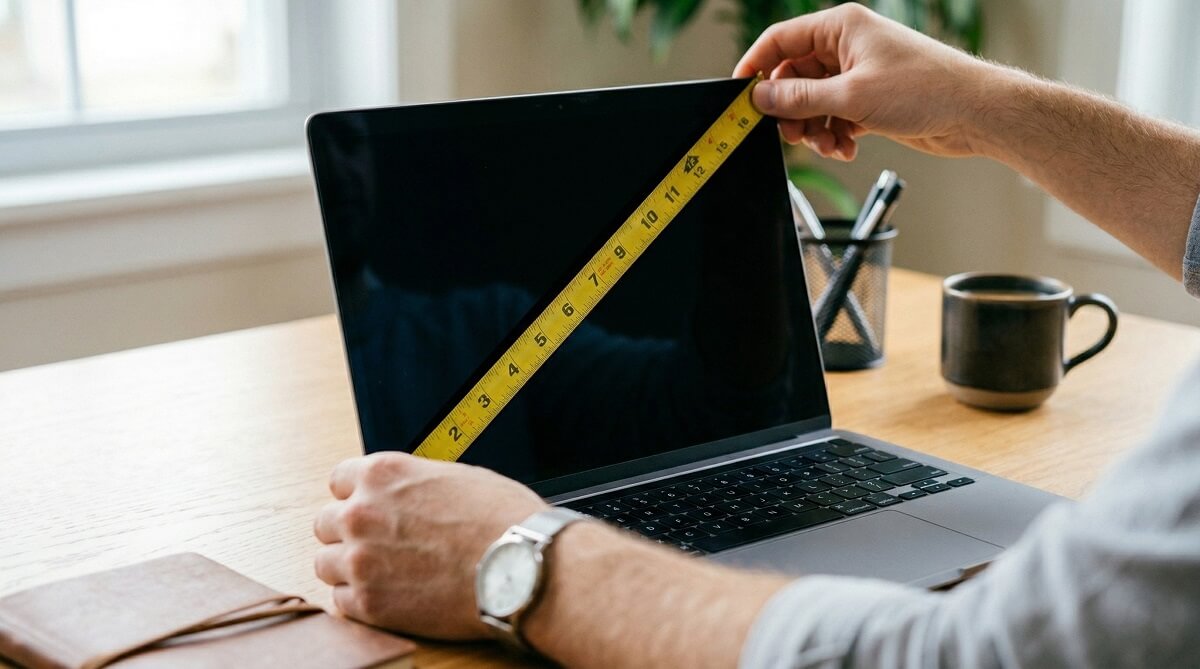
The number in your laptop’s name — “15-inch HP Envy,” “14-inch MacBook Pro” — refers to the diagonal measurement of the screen, not how wide the machine is. People assume it means the width and wind up ordering the wrong bag or wondering why their “15-inch” laptop is only 14 inches across. Both measurements matter, and they mean different things.
To measure screen size: open the laptop, grab a flexible tape measure, and run it from the bottom-left corner of the display to the top-right corner. Measure only the active screen area — not the plastic or metal frame around it. That diagonal number, in inches, is your laptop’s screen size. To measure the physical body: close the lid and record the width (left to right), depth (front to back), and thickness (bottom to top of the closed lid). Those numbers are what you actually need when shopping for a .
If you don’t have a tape measure handy, you can find your laptop’s size through Windows System Information or Mac’s “About This Mac” menu — then look up the full spec sheet on your manufacturer’s website. This guide covers both routes.
Which Measurement Do You Actually Need?
✅ Use Screen Size When:
- Identifying your laptop model or confirming which device you own
- Buying a screen protector, privacy filter, or external display accessory
- Checking compatibility with a docking station or port replicator
- Describing your laptop to tech support
✅ Use Physical Body Dimensions When:
- Buying a laptop sleeve, bag, backpack, or hard-shell case
- Checking whether your laptop fits in an overhead bin or desk drawer
- Comparing how portable two laptops will be side by side
- Shopping for a laptop stand or cooling pad with specific platform dimensions
What “Laptop Size” Actually Means
Screen Size Is the Diagonal — Not the Width
When a manufacturer calls something a “13-inch laptop,” that 13 inches is the diagonal distance from one corner of the active display to the opposite corner. The physical width of the machine — the distance from the left edge to the right edge — is always a different number, and it’s always larger than the screen size figure.
A concrete example: Apple’s MacBook Pro 14-inch (M4, 2024) has a 14.2-inch diagonal screen, but the laptop body measures 12.31 inches wide and 8.71 inches deep, according to Apple’s official tech specs. The HP EliteBook 840 14-inch G10 follows the same pattern — 14-inch screen, 12.42 inches wide, 8.82 inches deep, per HP’s product specifications. In both cases, “14-inch laptop” does not mean 14 inches across. It means the screen’s corner-to-corner diagonal is 14 inches.
This is why you can’t use screen size alone when shopping for a bag or case. go deeper on choosing the right device for your use case, but for shopping accessories, you always need the physical dimensions.
The Bezel Is Not Counted
The bezel is the frame — plastic or metal — that surrounds the display. Older laptops had thick bezels, sometimes half an inch wide on each side, meaning the lid was noticeably larger than the screen. On those machines, there’s a meaningful gap between where the bezel ends and where the screen begins: your tape measure should start at the image, not the frame.
Modern laptops have trimmed bezels down considerably. Some are so thin they’re nearly invisible. Even so, the measurement rule stays the same: you’re measuring the viewable display area only — where pixels actually appear. If your screen has rounded corners (as Apple’s newer displays do), measure across the full diagonal of the active image area.
How to Measure Your Laptop Screen Size (Step-by-Step)
What You’ll Need
A flexible cloth or plastic measuring tape works best — it conforms to the screen surface and gives you a clean diagonal reading. A rigid ruler is too short and too stiff for an accurate diagonal measurement. If you don’t have a tape measure at all, a sheet of standard printer paper (8.5 × 11 inches) can serve as a rough reference — more on that in the alternative methods section below.
Step 1 — Open the Laptop and Turn On the Screen
You need the display on so you can see exactly where the active image area begins and ends. The boundary between the displayed image and the surrounding frame is your starting point — not the outer edge of the lid.
Step 2 — Position the Tape at the Bottom-Left Corner of the Screen
Place the zero end of the tape at the bottom-left corner of the display — where the image starts, not where the bezel starts. If your display has rounded corners, start at the edge of the image in that corner (the pixel where the display begins to curve away).
Step 3 — Stretch the Tape Diagonally to the Top-Right Corner
Run the tape in a straight diagonal line to the top-right corner of the screen. Read the measurement where the image ends. That number, in inches, is your screen size.
Common results you’ll see:
- 11.6 inches (29.46 cm) — small ultraportables
- 13.3 inches (33.78 cm) — thin-and-light notebooks
- 14.0 inches (35.56 cm) — mainstream business laptops
- 15.0 inches (38.10 cm) — standard-size consumer notebooks
- 15.6 inches (39.62 cm) — most common laptop screen size sold in the US
- 17.3 inches (43.94 cm) — large gaming and workstation laptops
Conversion factor: 1 inch = 2.54 cm exactly.
How to Measure the Physical Body of Your Laptop
These measurements are taken with the lid closed. Open-lid readings will throw off your depth and thickness numbers.
Width (Left to Right)
Place the tape along the widest dimension of the closed laptop — from the leftmost point to the rightmost point. Include any rubber bumpers, ports, or protrusions that extend the overall footprint. Width is the number you compare against a bag’s “fits laptops up to X inches wide” specification.
Depth (Front to Back)
Measure from the front edge (the side closest to you when typing) straight back to the rear edge. Some manufacturers call this “length” — same measurement, different label. This determines whether the laptop will fit front-to-back in a bag compartment, which is particularly relevant for backpacks where the laptop compartment is vertical.
Thickness (Bottom to Top of Closed Lid)
Set the closed laptop on a flat surface and measure straight up from the table to the top of the lid. Measure at the thickest point — on tapered or “wedge” designs, the rear hinge area is usually the thickest. This measurement determines whether a slim hard-shell case will close properly around your machine.
For context: most modern ultrabooks and thin-and-light notebooks fall in the 0.5–0.7 inch (13–18 mm) range. Traditional business laptops and consumer notebooks tend to be 0.7–1.0 inch (18–25 mm). Older or budget designs can reach 1.0–1.3 inches (25–33 mm) or more.
Screen Size vs. Body Dimensions — Reference Table
This table maps common screen sizes to the typical physical dimensions you’ll encounter. Values are approximate — your specific model will vary. Always verify with your manufacturer’s spec sheet before buying a fitted case.
| Screen Size | Screen (cm) | Typical Width | Typical Depth | Typical Thickness |
|---|---|---|---|---|
| 11″–11.6″ | 27.9–29.5 cm | 10.5″–11.5″ | 7.3″–8.0″ | 0.5″–0.7″ |
| 13″–13.3″ | 33.0–33.8 cm | 11.5″–12.2″ | 7.9″–8.5″ | 0.4″–0.7″ |
| 14″ | 35.6 cm | 12.3″–12.5″ | 8.7″–8.9″ | 0.6″–0.8″ |
| 15″–15.6″ | 38.1–39.6 cm | 13.6″–14.2″ | 9.2″–9.9″ | 0.6″–0.9″ |
| 17″–17.3″ | 43.2–43.9 cm | 15.0″–16.0″ | 10.5″–11.0″ | 0.8″–1.1″ |
Real examples: MacBook Pro 14″ (M4, 2024) = 12.31″ wide × 8.71″ deep × 0.61″ thick, per Apple’s official specs. HP EliteBook 840 G10 14″ = 12.42″ wide × 8.82″ deep × 0.76″ thick, per HP product specifications.
How to Find Your Laptop’s Size Without a Tape Measure
Method 1 — Check the Bottom of the Laptop
Flip the laptop over. There’s usually a sticker on the bottom panel with the model name, serial number, and regulatory information. Write down the full model name (e.g., “HP Spectre x360 14-ef2010nr” or “DELL XPS 15 9530”), then search for it on the manufacturer’s website. Every brand publishes a spec sheet that lists screen size, dimensions, and weight.
Method 2 — Windows: System Information (msinfo32)
On any Windows laptop, press Win + R, type msinfo32, and press Enter. The System Information window opens with a summary that includes the “System Model” field. Copy that model name and run a search for it alongside “specifications” to pull up the full spec sheet from the manufacturer’s site. are available on ChubbytIps if you need additional help navigating your system.
Method 3 — Mac: About This Mac
Click the Apple menu in the top-left corner of your screen, then select “About This Mac.” The overview panel shows your model name — for example, “MacBook Pro 14-inch, M4, 2024.” From there, click “More Info” to see additional details, or visit Apple’s MacBook Pro specs page to find the exact physical dimensions for your model year.
Method 4 — Original Packaging or Purchase Receipt
The retail box almost always lists screen size and model number on the exterior. If you still have it, check there. A digital receipt or order confirmation from a retailer will include the model name, which you can look up directly.
No Tape Measure? Use a Sheet of Paper
Standard US printer paper is 8.5 × 11 inches. Hold the 11-inch side diagonally across your open screen. If the screen extends an inch or two past the paper, you’re looking at a 13-inch display. If it comfortably exceeds the paper length, you’re likely in 15-inch territory. This is a rough estimate — useful for confirming what you already suspect, not for buying a custom-fit case.
What If Your Measurement Falls Between Standard Sizes?
Not every laptop lands squarely on a standard size. Microsoft Surface laptops use 13.5-inch and 15-inch screens; some newer machines have 14.4-inch or 15.3-inch displays. include dimensions for each model we cover, which can save you the measuring step entirely. If your screen measurement falls between the common sizes:
- For bags and sleeves: round up to the next standard size. A sleeve listed for “up to 15.6 inches” will comfortably fit a 15.3-inch screen laptop.
- For snug hard-shell cases: rely on the physical body dimensions (width × depth × thickness), not the screen size. Hard cases are often sized by body footprint, and a “15-inch case” from different brands can vary considerably.
- For screen protectors or privacy filters: measure the screen’s height and width (not the diagonal), and match those dimensions to the product’s listed coverage area. 3M’s measuring guide for privacy filters explains this clearly.
Frequently Asked Questions
Why is laptop screen size measured diagonally?
The diagonal convention comes from the early days of televisions, where CRT screen tubes were round and the diagonal was the only consistent way to compare sizes across different aspect ratios. When monitors and later laptops adopted the same convention, it stuck. Every display device — TVs, monitors, tablets, phones, laptops — uses the same diagonal measurement standard. Wikipedia’s entry on display size documents this history if you want to go deeper.
Does laptop screen size include the bezel?
No. The screen size number refers only to the active display area — the portion where the image actually appears. The bezel (the frame around the screen) is not counted. This is true even on laptops with very thin bezels: you still measure from where the image starts to where it ends.
How do I measure a laptop for a bag?
Close the lid and measure the width (left to right) and depth (front to back) of the laptop body. Add at least 0.5–1 inch to each measurement to find the minimum interior bag compartment size you need. For backpacks, the laptop compartment is usually listed in terms of the screen size it accommodates (e.g., “fits up to 15.6-inch laptops”) — but when in doubt, check the compartment’s interior dimensions against your body measurements.
My screen measured 15.3 inches — what size bag do I need?
A bag listed as fitting “up to 15.6-inch laptops” will work for your 15.3-inch screen. For sleeves, look at the interior dimensions — you want the sleeve interior to be at least 0.5 inches wider and deeper than your laptop body. Check laptop bag options on Amazon filtered by “15-inch” or “16-inch” to compare interior dimensions across styles.
Can I check my laptop’s screen size from settings?
Windows doesn’t display screen diagonal size in its settings menu — it shows resolution, not physical size. The best software approach is to find your model name via System Information (Win + R → msinfo32 → System Model) and then look up the specs on the manufacturer’s website. On Mac, About This Mac shows the screen size directly in the model name (e.g., “MacBook Air 13-inch”).
What’s the difference between a 15-inch and a 15.6-inch laptop?
The screen diagonal is 0.6 inches larger on the 15.6-inch model — a minor visual difference. The physical body size is also slightly larger, typically adding about 0.5 inches to the width. Both will fit in most bags labeled for “15-inch or 15.6-inch” laptops. The key difference is that 15.6-inch is the more common US retail size, while 15-inch is used by a smaller number of models.
How do I find my laptop’s dimensions without measuring?
Check the model name (on the bottom sticker, in Windows msinfo32, or on Mac’s About This Mac), then search for it on the manufacturer’s website. Every brand publishes a spec sheet with exact width, depth, thickness, and weight. can also be a starting point for popular models.
Is laptop width the same as screen size?
No — and this trips people up constantly. A 14-inch laptop’s screen diagonal is 14 inches, but the body width is typically around 12.3–12.5 inches. A 15.6-inch laptop’s screen measures 15.6 inches diagonally, but the body width is around 14 inches. Screen size ≠ body width. Always measure or look up physical dimensions separately if you need them for a case or bag.
Once you have your measurements, finding the right case or bag becomes straightforward. Check current options on Amazon or Best Buy — filter by your screen size and compare interior compartment dimensions against your body measurements before ordering.
Looking for a new laptop? to find models in the right size for your needs.
