


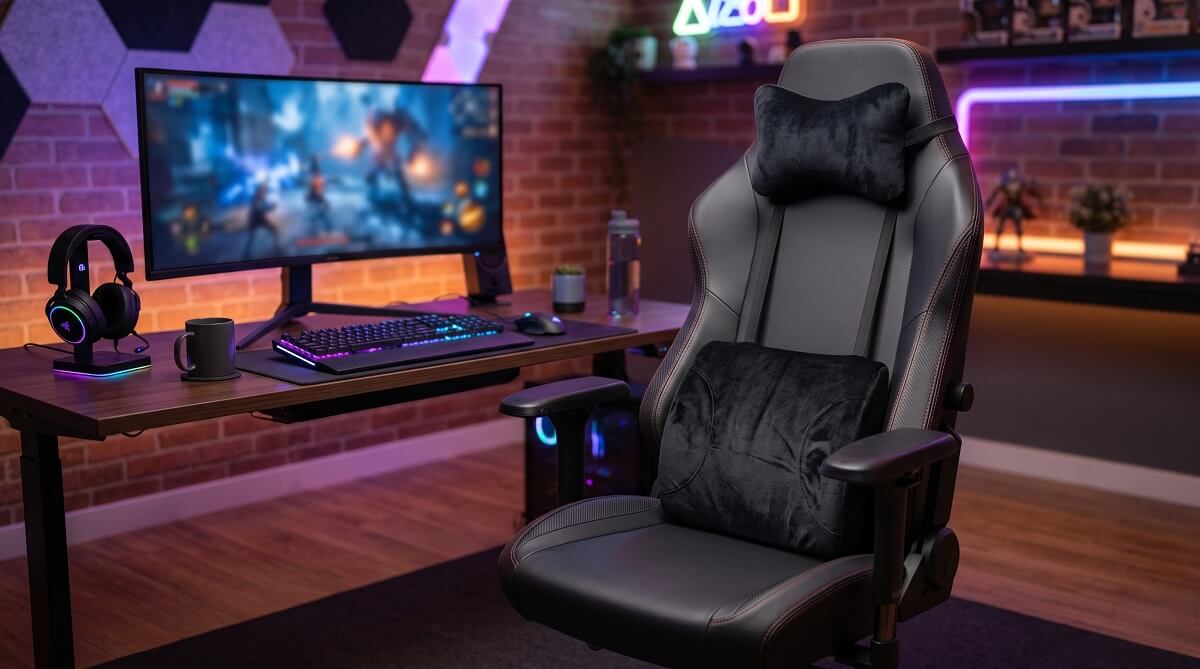
A gaming chair pillow is not one-size-fits-all. What you need depends on where you feel it after a long session. Lumbar pillows handle lower back soreness. Headrest pillows keep your neck from creeping forward. Seat cushions take the pressure off your tailbone and hips. Pick the wrong type and it makes no difference how much you spend — it just won’t solve your problem.
Most gaming chairs ship with a basic foam lumbar pillow and a neck roll. They hold up for a while. Once they go flat — usually somewhere between 6 and 18 months of regular use — you’ll need a replacement. Your choices are OEM replacements direct from your chair’s brand, which run $29 to $79, or from Amazon that often match the performance at a lower cost.
Below, we break down each type, what to look for in fill and fit, and specific picks across price tiers — including a full comparison table of brand-specific options from DXRacer, TechniSport, GTRacing, Blacklyte, and Secretlab. If you want a quick answer: for lower back support, go high-density memory foam with an adjustable strap. If you’re shopping for aesthetics, there’s a solid selection of plush and kawaii cushions too — just know style-first options trade some ergonomic function for looks.
Who Should (and Shouldn’t) Buy a Gaming Chair Pillow
✅ Buy One If:
- You feel lower back or neck soreness after sitting more than an hour
- Your chair’s stock cushion has gone flat or lost its shape
- You’re using an office chair and want better support without buying a whole new seat
- You want to personalize your setup with a specific color or aesthetic
❌ Skip (or Reconsider) If:
- Your chair already has built-in adjustable lumbar — adding a separate pillow on top often conflicts with it
- You game for 30 minutes or less at a time; posture impact is minimal at short durations
- You’ve already tried a lumbar pad and the real issue is your chair height or monitor position
If you’re still shopping for the chair itself, covers a range of options with built-in lumbar. Chairs like the Razer Iskur V2 ($649.99) include 6D built-in lumbar support, according to TechRadar’s gaming chair roundup — no separate pillow needed.
The Three Types of Gaming Chair Pillows
Before you buy anything, match the pillow type to your actual pain point. These categories have different shapes, positions, and functions.
Lumbar Pillows — Lower Back Support
Lumbar pillows sit at the small of your back, filling the gap between your lower spine and the chair’s backrest. They support the lumbar curve — roughly around the L4-L5 vertebrae — which tends to flatten when you slump forward during long sessions. Over time, that flattening puts real pressure on the discs and the muscles around them.
For a lumbar pillow to actually help, shape matters. A contoured or curved pad fits the natural inward curve of your lower back far better than a flat rectangle. Target dimensions are roughly 11–16 inches wide and 10–14 inches tall. Thickness of 3.5–5 inches hits the ergonomic sweet spot: enough support to fill the lumbar gap without pushing your hips away from the seatback.
Headrest / Neck Pillows — Cervical Spine Support
The headrest cushion mounts at the top of the chair backrest and supports your cervical spine — the neck and upper back region. It’s what keeps your head from drifting forward toward the screen, a habit that adds significant strain on the muscles and discs in the upper spine over hours of play.
Attachment method matters here more than with lumbar pillows. Magnetic headrests, like , adjust easily and stay put without sliding. Strap-based headrests work but tend to drift if the strap isn’t snug, which undermines their purpose.
Some gaming chairs include both a lumbar and headrest. Others only ship with one. If your chair only came with a lumbar pad, adding a headrest cushion is usually the best next step for neck comfort during long sessions.
Seat Cushions — Hip and Tailbone Relief
A seat cushion sits on the chair seat itself and redistributes the pressure on your tailbone (coccyx) and sit bones. This is the type to reach for if the main issue is hip discomfort or numbness in the legs — not back or neck pain.
Most effective seat cushions use a U-shaped or coccyx-cutout design. The cutout removes direct pressure from the tailbone, which takes the most load when you sit with poor posture. The Guidespot gaming chair cushion roundup rates the ComfiLife Gel Enhanced Seat Cushion (4.4/5 stars, 17.5×13.7 in) as a solid choice — it combines cooling gel with memory foam, and independent testing noted it maintains roughly 8°F lower surface temperature compared to foam-only alternatives.
What to Look for Before You Buy
Four factors separate a pillow that works from one that collects dust after two sessions.
Fill Material
Memory foam is the standard for a reason. It conforms to your body shape and supports the lumbar curve without collapsing under sustained weight. Look for high-density foam (3+ lb per cubic foot) — denser foam holds its shape longer before flattening. Most OEM gaming chair pillows from brands like DXRacer, Blacklyte, and TechniSport use memory foam.
Gel-infused memory foam adds a cooling layer that dissipates heat. If you run warm or game in a room without good airflow, a gel option like the GTRacing Gel Seat Cushion (from $59.99) is worth the extra cost. Secretlab’s Lumbar Pillow Pro ($71, on sale from $79 as of March 2026) uses their “PlushCell” proprietary visco-elastic foam with an added cooling gel layer — the extra thickness and gel are what justify the premium over their standard lumbar pillow.
Plush / polyester fill is the material in most aesthetic and kawaii-style cushions. Soft, lightweight, and available in a huge variety of shapes and colors — but it compresses faster than foam and offers minimal ergonomic support. Fine for shorter sessions or purely decorative purposes. Not a good call for 4+ hour gaming.
Size and Fit
OEM pillows are sized for their specific chair series, which means near-perfect fit but no flexibility. The Blacklyte Athena Lumbar Pillow, for instance, measures 11.8″ × 12.6″ × 4″ and is engineered specifically for Blacklyte Athena-series chairs. Use it on a different brand and you lose the compatibility advantage that justifies its $69 price.
Universal pillows use adjustable nylon or elastic straps and fit chairs from most brands. The trade-off: strap tension determines placement, and cheaper straps can loosen over time, letting the pillow slide down during play.
Attachment Method
- Adjustable straps: Most universal options; thread behind the chair back and tighten. Works well when the strap length matches your chair’s back height.
- Magnetic: Secretlab’s headrest system — repositionable without re-threading anything, stays in place reliably. Brand-locked by design.
- Fixed slot: Some gaming chairs have a headrest post or slot that accepts only the brand’s own pillow. Check your chair’s manual before buying third-party.
Cover and Washability
Gaming chair pillows absorb sweat over extended sessions. Look for a removable zip cover you can machine-wash in cold water on a gentle cycle. Air-dry the foam — never put it in a dryer. Mesh covers breathe better in warm environments; PU/leather covers wipe clean but trap heat faster.
Top Gaming Chair Pillows: OEM Brand Picks
If you own a chair from one of these brands, here are the OEM replacement and upgrade options — all verified from official brand pages as of March 2026. Check current pricing at each brand’s site before ordering.
| Pillow | Type | Price (as of 3/2026) | Fill | Dimensions | Compatible With |
|---|---|---|---|---|---|
| DXRacer Black Headrest | Headrest | $29 | Memory foam | — | DXRacer chairs (F size) |
| DXRacer Black Lumbar Pillow | Lumbar | $29 | Memory foam | — | DXRacer chairs (F size) |
| TechniSport GameON Set (Black) | Lumbar + Headrest | $39 | Memory foam | — | TechniSport chairs |
| GTRacing Memory Foam Lumbar | Lumbar | $54.99 (sale from $69.99) | Memory foam | — | GTRacing chairs |
| Blacklyte Athena Lumbar Pillow | Lumbar | $69 | High-density memory foam + nylon cover | 11.8″ × 12.6″ × 4″ | Blacklyte Athena series |
| Secretlab Lumbar Pillow Pro | Lumbar | $71 (sale from $79) | High-density visco-elastic foam + cooling gel | 15.6″ × 13.9″ | Secretlab TITAN Evo / Evo Lite only |
Source: Official brand websites — DXRacer, TechniSport, GTRacing, Blacklyte, Secretlab. Prices current as of March 2026 — verify before purchasing.
Third-Party / Universal Options (Amazon)
Don’t own a chair from those brands? Third-party pillows from Amazon work on practically any gaming or with strap attachment. Here are the standouts based on user reviews and independent roundups:
- Everlasting Comfort Lumbar Support Pillow — Over 143,000 customer reviews on Amazon; memory foam, lifetime replacement policy. One of the highest-volume options in the category.
- FORTEM Seat & Lumbar Support Set — 4.3/5 stars; two-piece set (seat + lumbar), 18×14 inches each, pure memory foam, 1-year warranty.
- ComfiLife Gel Enhanced Seat Cushion — 4.4/5 stars; 17.5×13.7 inches, gel-infused memory foam, non-slip bottom. Good choice if heat during long sessions is an issue.
Universal options typically run $25–$50 on Amazon. Check current pricing and availability directly — costs shift with promotions.
OEM vs Third-Party: Which Is Worth Paying For?
The honest answer depends on what you already have and what you’re trying to solve.
Go OEM if: Your chair cost $300+ and uses a proprietary attachment (magnetic headrest, dedicated slot, specific post). The Secretlab Lumbar Pillow Pro is the clearest example — at 15.6″ × 13.9″, it’s sized to work with their 4-way L-ADAPT lumbar support system. A third-party pillow layered on top of that system creates a support conflict rather than solving one. Their rating of 4.6/5 from 325 reviews suggests most buyers find it worth the premium for TITAN Evo owners.
Go third-party if: Your chair uses a standard strap slot or backrest slot, and you’re not locked into a brand ecosystem. A $35 universal memory foam lumbar from Amazon with a solid strap system will outperform a flat stock pillow. The Everlasting Comfort model’s 143,000+ reviews aren’t a coincidence — it delivers real lumbar support without the brand premium.
One caution: don’t stack a thick third-party lumbar pad on top of a chair’s existing built-in lumbar support. It creates awkward pressure distribution and usually makes posture worse. cover chair ergonomics setup if you want to get the positioning right.
How to Attach and Care for a Gaming Chair Pillow
Getting the Position Right
Lumbar positioning is where most people go wrong. The pillow should sit at the natural curve of your lower back — not your mid-back. A common mistake is setting it too high, which ends up pushing the shoulder blades forward rather than supporting the lumbar region.
To find the right spot: sit all the way back in your chair with your feet flat on the floor. The pillow should contact your back at roughly waist level. If you can slide a hand between your lower back and the chair without the cushion being in the way, it’s too high or too thin.
For headrest cushions: position the pad so it contacts the base of the skull and upper neck, not mid-neck. The goal is gentle support that keeps your head in a neutral position — not one that pushes your head forward.
Cleaning and Longevity
- Remove the cover and machine-wash in cold water on a delicate cycle. Air dry flat — avoid the dryer entirely, as heat breaks down foam cell structure.
- The foam core itself doesn’t need regular washing — spot clean with mild soap and a damp cloth if needed.
- Replace when the foam takes more than 30 seconds to spring back after you press it, or when the cushion has visibly lost height. Most quality memory foam pillows last 1–3 years with regular use before meaningful compression occurs.
- Gel seat cushions: same care routine, but keep away from prolonged direct sunlight — UV exposure degrades gel faster than foam.
Frequently Asked Questions
Can I use any gaming chair pillow on my chair?
Universal pillows with adjustable straps work on most chairs, but OEM pillows from brands like Secretlab and Blacklyte are designed for their specific chair series. Using an OEM pillow from one brand on another brand’s chair usually works mechanically, but the fit and sizing won’t be optimized. Always check attachment compatibility before buying.
How often should I replace a gaming chair pillow?
Most high-density memory foam pillows maintain their support for 1–3 years of regular use. A good test: press the foam firmly and count how long it takes to spring back. If it takes more than 30 seconds or doesn’t fully return to its original height, the foam cell structure has broken down and the pillow needs replacing.
Is memory foam or gel better for a gaming chair pillow?
Memory foam is better for structural lumbar support. Gel-infused memory foam adds cooling, which helps if you run warm or game in a room with limited airflow. Pure gel seat cushions like GTRacing’s ($59.99 and up) focus on temperature regulation. For most users, quality memory foam is the right call — add gel if heat is a specific complaint.
Does a gaming chair pillow actually help with back pain?
A lumbar pillow helps if the issue is inadequate lower back support from your chair — which is a common problem, especially after stock pillows flatten. It won’t fix pain caused by underlying medical issues or completely wrong chair ergonomics. If adding a pillow doesn’t improve things within a week of consistent use, the problem is likely chair height, desk height, or monitor position instead.
What size lumbar pillow fits a gaming chair?
Most gaming chair lumbar pillows run 11–16 inches wide and 10–14 inches tall, with 3.5–5 inches of thickness. The Blacklyte Athena Lumbar is 11.8″ × 12.6″ × 4″, while the Secretlab Lumbar Pillow Pro is a larger 15.6″ × 13.9″. Wider and taller pillows distribute support across more of the lower back, which is beneficial for taller users.
How do I stop my gaming chair pillow from sliding?
Make sure the strap is routed correctly — most universal pillows thread behind the chair’s back, not over the top. Tighten the strap until the pillow doesn’t shift when you move in your chair. Some pillows have a non-slip backing that grips the chair material; if yours doesn’t, a small piece of non-slip shelf liner between the pillow and chair back works surprisingly well.
Are kawaii gaming chair pillows good for support?
Most kawaii and aesthetic-style cushions (like those from Roomtery) use polyester plush fill rather than memory foam. They’re soft and look great but compress faster and offer limited lumbar support. If looks matter and you don’t sit for long stretches, they’re a reasonable choice. For anything over an hour of seated gaming, a memory foam option will serve you better.
Can I wash my gaming chair pillow?
The cover, yes — remove it and wash in cold water on a delicate cycle, then air dry. The foam itself should not go in a washing machine. Spot-clean the foam with mild soap and a damp cloth if needed. Never put foam in a dryer.
For OEM replacements, check pricing directly at each brand’s official site: DXRacer, Secretlab, GTRacing, and Blacklyte. For universal options, browse or search Amazon directly for the brands mentioned above. Prices change frequently, so verify before buying.
