


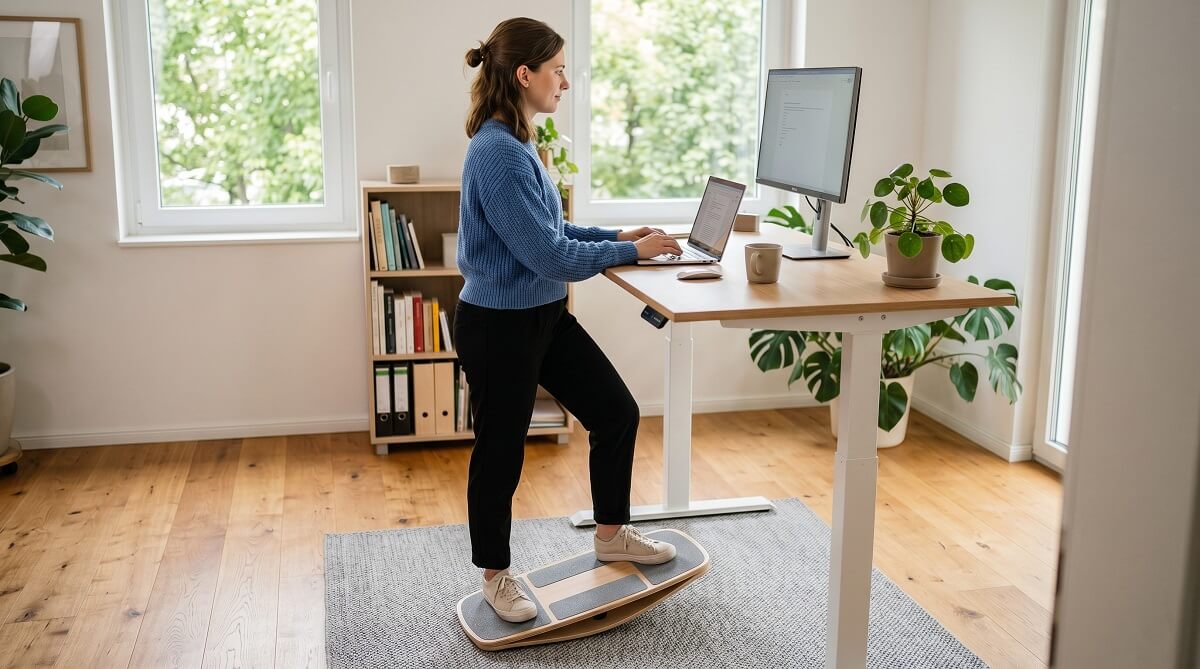
If your legs give out after 20 to 30 minutes at a standing desk, a balance board is one of the more effective fixes. The gentle, continuous motion keeps your muscles firing and your blood circulating — which is why most users report being able to stand 50 to 100 percent longer after adding one. The sweet spot for most people is somewhere between $100 and $200, and there are solid options at every point in that range.
Not all boards work the same way. Cheaper rocker-style boards tilt on one axis — left or right only. Mid-range 360° boards are the most popular category; they let you shift in any direction without feeling locked in, and you can stand still when you need to concentrate. Premium options like the FluidStance Level (from $289) or Movemate ($359) bring better materials and engineering, but they’re hard to justify unless you’re at your desk eight-plus hours daily.
This guide covers the main types, what separates a $50 board from a $350 one, the specs that actually matter, and a few first-timer mistakes — like forgetting to raise your desk before you step on.
Should You Get a Balance Board for Your Standing Desk?
✅ Worth buying if you:
- Stand at your desk 1–4+ hours daily and feel foot or leg fatigue creeping in
- Want to stand longer without having to force yourself through it
- Work on a hard floor (hardwood, tile, concrete) where the board won’t slip
- Find a flat anti-fatigue mat isn’t quite cutting it
❌ Skip it for now if you:
- Currently stand less than 30 minutes a day — build the habit first before adding complexity
- Have recent ankle or knee injuries, or are recovering from surgery (check with a physical therapist)
- Work on deep-pile carpet — most boards slip or become unstable on soft surfaces
- Need the floor space for other equipment or movement
Balance Board vs. Anti-Fatigue Mat: Two Different Tools
These two products solve related but different problems. like mats and boards often get lumped together, but the distinction matters before you spend money.
What an anti-fatigue mat does
A standard anti-fatigue mat cushions your feet and reduces joint impact from standing on hard floors. It’s passive — you just stand on it. If you’re new to standing desks or your job keeps you on your feet all day without much desk focus required, a mat is the right starting point. No learning curve, no adjustment period.
What a balance board adds
A balance board introduces active engagement. Small muscles in your ankles, calves, and core fire constantly to keep you upright, which extends how long you can stand rather than just how comfortable it is. Research from Dr. James Levine of the Mayo Clinic found that using a standing desk balance board increased energy expenditure by 19.2% compared to sitting — a meaningful bump without doing anything that looks like exercise.
The tradeoff: balance boards require a 2–4 week adaptation period. The first few days can feel awkward, and independent lab testing by WorkWhileWalking found that many boards not specifically designed for desk use can reduce typing and mouse accuracy. Ergonomic-specific 360° boards handle this better. Most users find their groove within a couple of weeks.
Can you use both?
Yes — and some boards make it easy. The Uncaged Ergonomics BASE ($99.99) includes a cushioned anti-fatigue mat deck on top, combining both functions. Using a thick separate mat under a balance board isn’t recommended, though — it destabilizes the board and defeats the purpose.
The Three Main Types of Standing Desk Balance Boards
1. Rocker Boards (Side-to-Side Only)
The simplest design. A curved base lets you tilt left or right, nothing else. Good entry point for people who want subtle movement and a short learning curve. The limitation is that the single axis gets repetitive fast, and you can’t shift forward or backward when you want variety.
2. 360° Balance Boards (Most Popular)
These move in all directions — left, right, forward, back, circular. You can stand still or rock and shift depending on your task. This is the best category for desk work because you stay in control: move when you want, stay steady when you’re focused on something demanding.
The Uncaged Ergonomics BASE ($99.99) and BASE+ ($129.99) fall here. Both use a patented 360° base, ship fully assembled, and weigh under 13 pounds for easy repositioning. The BASE uses a cushioned polyurethane deck; the BASE+ swaps that for a bamboo top on an aluminum frame — firmer, cleaner-looking, easier to wipe down. for more on how to evaluate standing desk add-ons.
3. Adjustable / Modular Boards
These let you change the difficulty. The LifeSpan Fitness Aero Balance Board ($179) uses four air-filled cushions on the underside that you can reposition — spread them wide for a stable, gentle rock, or move them inward for more challenge. A solid pick for people who want to progress over time rather than buying a new product as they get more comfortable.
Balance Board Comparison: Specs and Pricing (March 2026)
| Board | Type | Price | Dimensions | Max Weight | Material | Notable |
|---|---|---|---|---|---|---|
| FEZIBO Wooden Wobble Board | Rocker | ~$39–$60 | 25″ × 12″ | 320 lbs | Wood + foam | Budget pick; 8.5° tilt |
| Uncaged Ergonomics BASE | 360° | $99.99 | 23.5″ × 13.25″ × 3″ | ~330 lbs | PP/Polyurethane | Anti-fatigue mat deck; patented |
| Uncaged Ergonomics BASE+ | 360° | $129.99 | 23.5″ × 13.5″ × 3″ | ~330 lbs | Aluminum + Bamboo | Premium look; easy to clean |
| LifeSpan Fitness Aero | Adjustable | $179.00 | 23″ × 16″ × 4.5″ | 350 lbs | Wood + rubber | 4 repositionable cushions |
| FluidStance Plane Cloud | 360° | $189.00 | n/a | 250 lbs | Recycled materials | Eco-focused; lifetime guarantee |
| FluidStance Level | 360° | from $289.00 | n/a | 300 lbs | Premium wood + die-cast aluminum | Higher tilt; lifetime guarantee |
| Movemate | Multi-slat | $359.00 | 26.5″ × 11.1″ × 2.75″ | 400 lbs | Baltic birch plywood | HSA/FSA eligible; PT-designed |
Prices as of March 2026. Check current pricing before purchasing — these fluctuate.
What to Look For When Buying a Standing Desk Balance Board
Range of motion (tilt degrees)
For desk use, 8–12° is the practical range — enough to keep your legs engaged without constantly fighting for stability. Options designed for fitness or rehab often go to 15° or higher, which feels great in a gym and distracting at a workstation. The FEZIBO’s 8.5° is a reasonable starting point; FluidStance boards tend toward gentler slopes by design.
Size and footprint
Most boards run 23–27 inches long and 11–16 inches wide. Measure your floor space before buying. If you shift positions frequently throughout the day, a narrower board (like the Movemate at 11.1 inches wide) makes repositioning easier. If you tend to stand in one spot, a wider platform (like the LifeSpan Aero at 16 inches) gives more room for different foot positions. to compare sizing options.
Weight capacity
Most boards handle 300–400 lbs, so this is rarely a practical issue. That said, the FluidStance Plane Cloud maxes at 250 lbs — worth checking if you’re near that range. The Movemate tops the charts at 400 lbs.
Surface material
Cushioned decks (foam, polyurethane) are more forgiving on your feet but offer less tactile feedback. Wood and bamboo decks (BASE+, FluidStance Level) feel firmer, give better proprioceptive cues, and wipe clean easily. If you work in socks, look for a textured grip surface — smooth wood can get slippery.
Desk height adjustment
This trips people up. A balance board sits 2.75–4.5 inches tall depending on the model — that’s real height your body gains. If you don’t raise your desk to compensate, you’ll end up hunching or over-reaching within minutes. Check your desk’s maximum height before buying a board; some sit-stand desks top out lower than you’d think. for a full ergonomic checklist.
Mistakes First-Timers Make (and How to Avoid Them)
Certain patterns show up repeatedly among people who pick up a balance board and abandon it after two weeks. Avoid these:
- Standing on it for two hours straight on day one. Your ankles and calves will hate you. Most ergonomics resources recommend starting with 10–15 minute sessions and building from there over several weeks.
- Not adjusting desk height first. Raise your desk before stepping on the board. This single mistake causes more discomfort than the board itself.
- Wearing thick cushioned sneakers. Soft soles absorb the very feedback signals the board is trying to send your feet. Socks or thin-soled footwear work noticeably better.
- Using it on thick carpet. Most boards are designed for hard floors. Deep-pile carpet reduces stability and can cause the board to rock unpredictably. Low-pile carpet is usually fine.
- Expecting immediate comfort. The first week can feel awkward. That’s normal. Most users find their footing within 10–14 days.
Frequently Asked Questions
Is a balance board better than an anti-fatigue mat?
They serve different purposes. An anti-fatigue mat is passive cushioning; a balance board is active engagement. If comfort is your main concern, start with a mat. If you want to extend how long you can stand and get some light muscle activation in the process, a balance board is the stronger pick. Some options include a cushioned deck, so you don’t have to choose one or the other.
Do I have to constantly balance? Will it mess up my concentration?
Not with a 360° board. The best office-use designs let you stand still when you need to focus — the board doesn’t tip you if you’re not actively moving. Most people report that within a week or two, the micro-movements become subconscious and stop requiring mental bandwidth.
Can I use a balance board on carpet?
Low-pile carpet is usually workable. Deep-pile or plush carpet reduces stability and lets the board slide around. Hard floors — hardwood, tile, or concrete — give the cleanest experience. Most manufacturers include non-skid rubber bottoms, but those have limits on soft surfaces.
What muscles does a standing desk balance board work?
The primary ones are in your feet, ankles, and calves. Your core and hip stabilizers also engage continuously to keep you upright. Over time, this adds up to meaningful lower-body and core conditioning without any dedicated workout time.
Are balance boards HSA/FSA eligible?
Some are. Movemate explicitly lists HSA/FSA eligibility on their product page. Other brands may qualify depending on how your plan administrator categorizes them — worth confirming before you buy rather than assuming. for more context.
How long should I stand on a balance board at once?
Beginners should start with 10–15 minute sessions. As you adapt, work toward 25–30 minute intervals, alternating with regular standing or sitting. The consensus from ergonomics resources is that short sessions spread across the day work better than grinding through one long stretch. Listen to your ankles — they’ll tell you when they’re done.
How much do standing desk balance boards cost?
Budget options on Amazon (like the FEZIBO wooden wobble board) start around $39–$60. The best value range is $100–$180, which covers the Uncaged Ergonomics BASE ($99.99), BASE+ ($129.99), and the LifeSpan Aero ($179). Premium boards from FluidStance and Movemate run $189–$389. Check current prices — these shift with sales and seasonal promotions.
Will a balance board raise my desk height?
Yes. Boards range from about 2.75 to 4.5 inches tall. Adjust your desk accordingly before you start your first session. If you skip this step, you’ll end up with poor posture regardless of how good the board is.
Where to Buy a Standing Desk Balance Board
If you’re trying one for the first time, the Uncaged Ergonomics BASE on Amazon ($99.99) is a low-risk starting point — it ships assembled, offers 360° motion, and has free returns. If you want a cleaner aesthetic, the BASE+ with bamboo deck ($129.99) is worth the extra $30. For adjustable challenge or higher weight capacity, the LifeSpan Aero at LifeSpan’s site ($179) is solid. And if budget isn’t the constraint, FluidStance’s lineup starts at $189 and comes with a lifetime guarantee.
for anti-fatigue mats, monitor arms, and other ergonomic add-ons that pair well with a balance board setup.
