


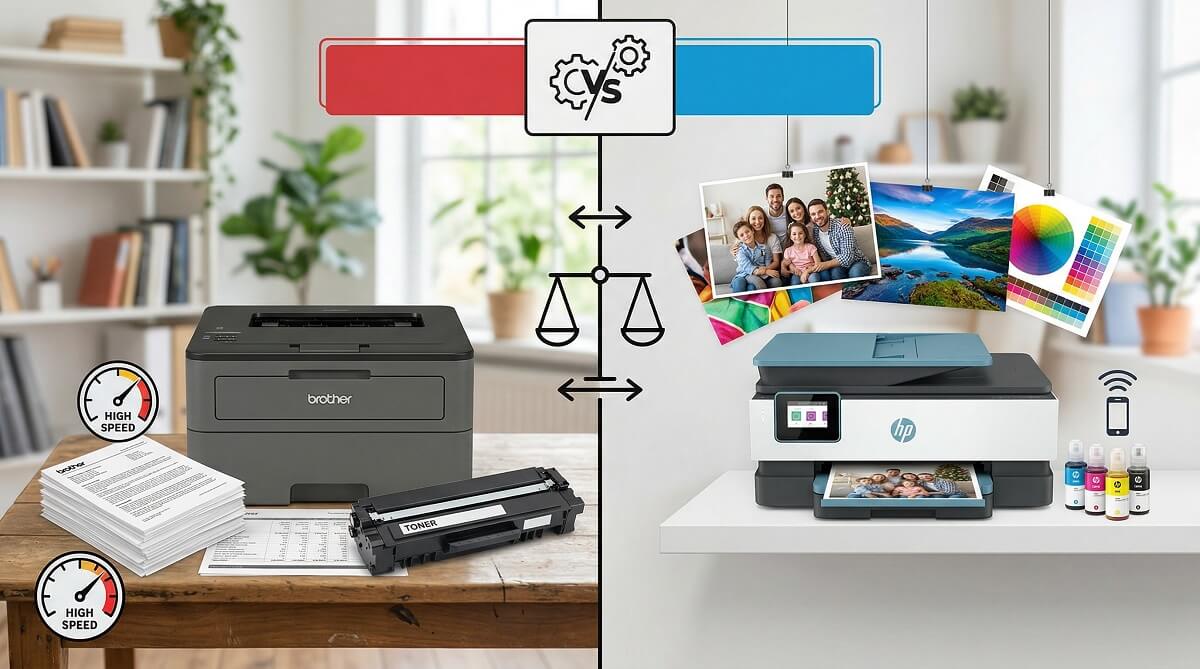
For most home users who print occasionally, HP inkjets are easier to set up and better for photos. But if you print regularly — or just want a printer that works without babysitting — a Brother laser printer is the stronger long-term buy. The cost per page is lower, the toner doesn’t dry out between uses, and these machines tend to run for years with minimal upkeep. for a broader look at what’s on the market.
The core tension between these two brands comes down to what you print and how often. HP has more models, a slicker app experience, and better photo output. Brother trades some of that polish for raw reliability and significantly lower ongoing supply costs — especially on its laser lineup. Neither choice is wrong; they’re optimized for different priorities.
This guide covers both brands across the categories that actually matter: print quality, running costs, speed, multifunction features, and the use cases each handles best. Pricing is based on verified data from Amazon, Best Buy, and official manufacturer pages as of March 2026 — check current pricing before buying, as it shifts.
Brother or HP? A 30-Second Decision Guide
✅ Choose Brother If You:
- Print mostly black-and-white documents, invoices, or text-heavy pages
- Print more than 50 pages per month
- Want the lowest possible cost per page over time
- Need a printer that sits idle for weeks and still works when you pick it up
- Run a small office or home office with high daily use
- Use Linux — Brother has the best cross-platform compatibility of the two
❌ Skip Brother If You:
- Print high-quality photos regularly and want vibrant, true-to-life color
- Rarely print and want the lowest possible sticker price
- Need the most compact, beginner-friendly home all-in-one
✅ Choose HP If You:
- Print photos and want warmer, more vivid color output
- Value a polished, intuitive experience with the HP Smart app
- Print occasionally and upfront cost matters more than long-term supply savings
- Use HP Instant Ink and your monthly print volume fits one of its tiers
- Need strong cloud printing and mobile integration
❌ Skip HP If You:
- Print in high volume and want the lowest cost per page
- Want to use third-party ink without firmware interference
- Need a heavy-duty office laser printer built for sustained daily use
What You’re Actually Choosing Between: Ink vs. Laser First
Before comparing brands, you need to decide on technology. Both Brother and HP sell inkjet and laser printers, but they each have a clear home base. if you’re new to printer shopping and want a primer on the basics.
Brother’s Strength Is in Laser
Brother makes inkjets, but its reputation — and the bulk of its loyal users — rests on its laser lineup. The monochrome HL series, color HL-L3000 series, and the MFC multifunction lineup cover everything from a simple home office printer to a full-featured small-business workhorse. Laser toner doesn’t dry out, page yields are high, and the machines are built to handle thousands of prints a month without complaint.
Per the official Brother USA specs, the HL-L3280CDW color laser has a maximum monthly duty cycle of 40,000 pages and a recommended volume of 3,000 pages — capacity that most home inkjets can’t touch.
HP Straddles Both Markets
HP’s product range is broader. The DeskJet and ENVY lines serve casual home users who print photos and the occasional document. The OfficeJet Pro series handles small-business all-in-one needs. The LaserJet line competes directly with Brother in the office laser segment. More choice means more decisions, though — HP’s wider catalog makes it harder to pick the right model without research.
Print Quality: Text, Photos, and Color
Text and Document Printing
Both brands produce sharp, readable text. Brother laser printers deliver crisp blacks and consistent output at speed — exactly what you want when printing invoices, reports, or contracts. Most HP inkjets also do fine on text, though some models show slight feathering on cheaper paper.
For document-heavy printing, Brother laser wins on consistency and volume capacity. An HP LaserJet competes closely, but HP’s inkjet lineup trails on text sharpness at high page counts.
Photo and Color Printing
HP has a real edge here. The ENVY and OfficeJet inkjet lines produce warmer, more vivid colors that translate well to photos and graphics. Brother’s color laser printers — like the HL-L3280CDW — do a solid job on business charts and colorful handouts, but they won’t match an inkjet for glossy photo quality.
In hands-on testing by WIRED (December 2025), the Brother HL-L3280CDW showed “nice crisp detail level” but is better suited to office documents than photo prints. HP’s inkjet options remain the better pick if photos matter to you.
Color Accuracy
HP inkjets produce warmer tones with higher vibrancy — better for photo enthusiasts and design work. Brother color lasers skew slightly cooler but stay accurate enough for business graphics. For everyday document use, the difference is rarely noticeable. For photos you want to frame or share, HP wins the comparison.
Running Costs: Where the Real Difference Lives
The sticker price is only part of the story. The cost of ink or toner over the life of the printer often exceeds the hardware price itself — sometimes by a wide margin. This is where Brother pulls ahead for high-volume users.
Cost Per Page: Laser vs. Inkjet
Laser toner has a lower cost per page than inkjet cartridges, full stop. A Brother TN760 toner cartridge yields approximately 3,000 pages per the ISO/IEC 19752 standard, according to Brother’s official product page, with an MSRP of $98.29 (frequently available at sale prices around $74.99). That works out to roughly 2.5–3 cents per page — comparable to what Brother’s own cost-per-page data shows.
HP inkjet cartridges tend to run higher per page for most users, unless you’re on the Instant Ink subscription at a plan that matches your volume.
HP Instant Ink: When the Subscription Makes Sense
HP’s Instant Ink service charges by pages printed per month rather than per cartridge. Current plans (as of March 2026, verified from HP’s official plans page):
- $1.79/month — up to 10 pages
- $5.49/month — up to 50 pages
- $7.99/month — up to 100 pages
- $15.99/month — up to 300 pages
- $31.99/month — up to 700 pages
- Additional pages: $1.50 per 10 pages on any plan
The subscription works well if your volume is predictable and consistent. For households that print 50–100 pages a month fairly reliably, the math can favor HP. For anyone with variable print volumes — printing 200 pages one month and 20 the next — you’ll likely overpay on average.
Third-Party Ink and Toner Compatibility
This is one of the clearest real-world differences between the two brands. Brother printers are broadly compatible with third-party toner cartridges, and the company hasn’t used firmware updates to block them. HP has a documented history of doing exactly that.
HP’s Dynamic Security feature, introduced in 2016 and still active, allows HP printers to reject cartridges that don’t carry an HP chip. As recently as 2025, firmware updates pushed automatically to connected HP printers locked out users of third-party cartridges — including a March 2025 update that affected HP LaserJet MFP M234 owners, who saw “Non-HP Chip Detected” errors after the update installed overnight, per reporting from Tonercom (July 2025) and PCWorld. If third-party ink is part of your long-term savings plan, HP requires careful attention to firmware settings.
Speed and Paper Handling
Printing Speed
Brother mono laser printers are fast. The HL-L2460DW prints at up to 36 pages per minute, per official Brother specs. A 20-page document is done in under 40 seconds. The HL-L3280CDW color laser prints at 27 ppm in both black and color — slower than mono, but still quick for the category.
HP’s LaserJet lineup hits comparable speeds at the high end, with some business models reaching 40 ppm. HP inkjets run slower — typically 10–20 ppm — which matters if you’re printing large batches regularly. For a broader look at how speed factors into the purchase decision, our covers the key specs to check.
Paper Capacity and Handling
Both the Brother HL-L2460DW and HL-L3280CDW ship with 250-sheet standard trays, plus a single-sheet manual feed slot for envelopes and specialty media. Automatic duplex (two-sided) printing comes standard on both.
HP home inkjets often start at 100–150 sheets, stepping up to 250 on mid-range models. For an office that needs fewer trips to reload paper, Brother’s standard tray sizes are a practical advantage.
Scan, Copy, and Fax
Brother MFP: Built for Business Throughput
Brother’s MFC lineup — models like the MFC-L2820DW and MFC-L8905CDW — are designed for business-level scanning and copying. Most include an Auto Document Feeder (ADF) for batch scanning without manually flipping pages, fax capability, and high-resolution flatbed scanners. If your office regularly handles stacks of signed documents or multi-page scans, these are worth the price premium over a print-only model.
HP All-in-One: Designed for Home
HP’s OfficeJet and ENVY all-in-ones are strong for occasional home use — easy to set up, well-integrated with the HP Smart app, and capable enough for the standard household tasks of scanning a form, copying a receipt, or sending the occasional fax. The HP OfficeJet Pro 9125e, named in multiple roundups, includes both a flatbed and ADF and handles most home office tasks cleanly.
Per WIRED’s December 2025 testing, the HP Color LaserJet Pro MFP 3301sdw — their “Best Home Office Printer” pick — is “fully connected, with Dual-Band Wi-Fi, Ethernet, and USB,” but the document feeder “likes to crunch documents if you don’t get the holders positioned exactly right.” That’s a genuine caveat for an office where reliable ADF performance matters.
Connectivity and Software
Both brands cover the connectivity basics: Wi-Fi (dual-band on most 2024–2025 models), Ethernet, USB, AirPrint, and Mopria for Android devices. Mobile printing works on both through dedicated apps.
HP Smart, the company’s app for iOS and Android, is widely regarded as the more polished experience. It handles printing, scanning, and printer management with a clean interface that most users can navigate without reading a manual.
Brother’s app — Brother Mobile Connect — covers the same functions with a more utilitarian interface. It works reliably; it just doesn’t feel as refined. Where Brother does stand out is cross-platform compatibility: the HL-L2460DW officially supports Windows, Mac, Linux, and Chrome OS per official specs. Linux users in particular have historically gravitated toward Brother for this reason, though driver support quality varies by distribution.
Reliability and Long-Term Ownership
Ask longtime laser printer users about Brother, and the most common description you’ll hear is “it just works.” That reputation is earned. Laser toner doesn’t dry out sitting idle for weeks — unlike inkjet cartridges, which can clog if a printer goes unused. For households that print occasionally but need the printer to work every single time, a Brother laser is the more dependable option.
HP inkjets, like all inkjets, can suffer clogged printheads if left unused too long. HP has acknowledged this in some product documentation. It doesn’t disqualify HP inkjets — regular use prevents the issue — but it’s a real consideration for anyone who prints infrequently.
Both brands offer standard 1-year limited warranties. HP Care Pack plans extend coverage to 3 years on eligible models; Brother offers similar extensions through authorized service providers. Check coverage at time of purchase — warranty terms can differ by region and model. for long-term reliability data on specific models.
Brother vs HP: Model Comparison Table
Prices based on WIRED’s December 2025 testing and current Best Buy/Amazon listings as of March 2026. Check retailers for current pricing.
| Feature | Brother HL-L2460DW | Brother HL-L3280CDW | HP Color LaserJet Pro MFP 3301sdw | HP OfficeJet Pro 9125e |
|---|---|---|---|---|
| Type | Mono Laser | Color Laser | Color Laser MFP | Color Inkjet MFP |
| Price (Amazon, ~Mar 2026) | ~$180 | ~$345 | ~$539 | ~$310 |
| Print Speed | 36 ppm | 27 ppm (color) | ~25 ppm | ~18 ppm |
| Paper Tray | 250 sheets | 250 sheets | 250 sheets | 250 sheets |
| Scanner / Copier | No | No | Yes (flatbed + ADF) | Yes (flatbed + ADF) |
| Duplex Printing | Yes (auto) | Yes (auto) | Yes (auto) | Yes (auto) |
| Wi-Fi | Dual-band | Dual-band | Dual-band | Yes |
| Linux Support | Yes (official) | Yes (official) | Limited | Limited |
| Best For | Home office, high-volume B&W | Color docs, small office | Home office MFP, color | All-in-one home/small office |
Sources: Brother official specs, WIRED (Dec 2025). Prices vary — check current pricing before purchasing.
Who Should Buy Which Brand
Buy Brother If…
- You print mostly documents, text, invoices, or shipping labels
- Volume matters — more than 50 pages per month
- Low cost per page over time is your priority
- You want a machine that will sit idle and still fire up reliably when needed
- You’re managing a small workgroup or home office
- You use Linux or need broad OS compatibility
Buy HP If…
- You print photos and want vivid, accurate colors
- Ease of use and a polished app experience matter most
- Low upfront cost is the priority over long-term supply savings
- HP Instant Ink’s subscription model fits your monthly volume predictably
- You need a compact, feature-rich all-in-one for a home or small office
Frequently Asked Questions
Is Brother or HP more reliable?
Brother laser printers have a strong reliability reputation, particularly for users who don’t print every day. Laser toner doesn’t dry out between uses, so the printer is ready whenever you need it. HP inkjets can develop clogged print heads if left idle for extended periods. For occasional-use households that still need reliable output, Brother laser is the safer pick. HP’s LaserJet line is also reliable in a business context.
Which has cheaper ink — Brother or HP?
Brother laser toner typically has a lower cost per page than HP inkjet cartridges. A Brother TN760 yields about 3,000 pages at an MSRP of $98.29 — roughly 3 cents per page. HP inkjet cartridges vary widely by model and yield, but standard cartridges often cost more per page without an Instant Ink subscription. HP Instant Ink can lower per-page costs for users with consistent monthly volume.
Does HP block third-party ink cartridges?
Yes, some HP models do. HP’s Dynamic Security feature detects non-HP chips and blocks those cartridges from printing. Automatic firmware updates can reintroduce these blocks even if you previously disabled them. As recently as March 2025, an HP firmware update locked out third-party toner on HP LaserJet MFP M234 models. Brother does not have equivalent firmware restrictions.
Is HP Instant Ink worth it?
For users with predictable, moderate monthly print volumes — say, 50–100 pages consistently — the $5.49 or $7.99 plans can deliver reasonable value. The service is less attractive if your volume is variable (high some months, very low others) or if you print in very high volumes where even the $31.99 tier may not cover usage. It also requires keeping your printer connected to Wi-Fi and linked to your HP account.
Which printer is better for photos?
HP. HP inkjet printers — particularly the ENVY and OfficeJet lines — produce warmer, more vivid colors that translate well to photos. Brother’s color laser printers are solid for business graphics but deliver less saturated, cooler output for photo prints. If photo printing is a regular use case, HP is the stronger choice.
Do Brother printers work well with Mac and Linux?
Mac: yes, generally. There’s a documented older bug with the built-in Mac scanner app on some MFC models producing garbled B&W PDF scans, but most current models work fine. Linux: Brother officially supports Linux and Chrome OS on models like the HL-L2460DW. The quality of the experience depends on your distribution and whether you use Brother’s official packages or open-source alternatives. Overall, Brother has better Linux support than HP.
What’s the best Brother printer for a home office?
For a home office that prints mostly documents in black and white, the Brother HL-L2460DW (~$180) is hard to beat: 36 ppm, dual-band Wi-Fi, auto-duplex, and low running costs. If you need color printing as well, the HL-L3280CDW (~$345) adds color laser output without a scanner. For scan-copy-print-fax capability, the MFC-L2820DW covers all the bases.
What’s the best HP printer for home use?
For most home users, the HP OfficeJet Pro 9125e (~$310) covers the most ground: color inkjet printing, flatbed scanner, ADF, fax, and a polished app experience. If budget is tight and photo printing isn’t a priority, HP’s DeskJet and ENVY lines offer lower upfront cost. For a home office that needs a color laser, the HP Color LaserJet Pro MFP 3301sdw (~$539) is a well-reviewed option — WIRED called it their “Best Home Office Printer” in December 2025. Browse our for detailed test comparisons across both brands.
Check current prices and availability at Amazon or Best Buy for Brother printers, and Amazon or Best Buy for HP printers. Prices shift regularly, and both retailers often run promotions.
