


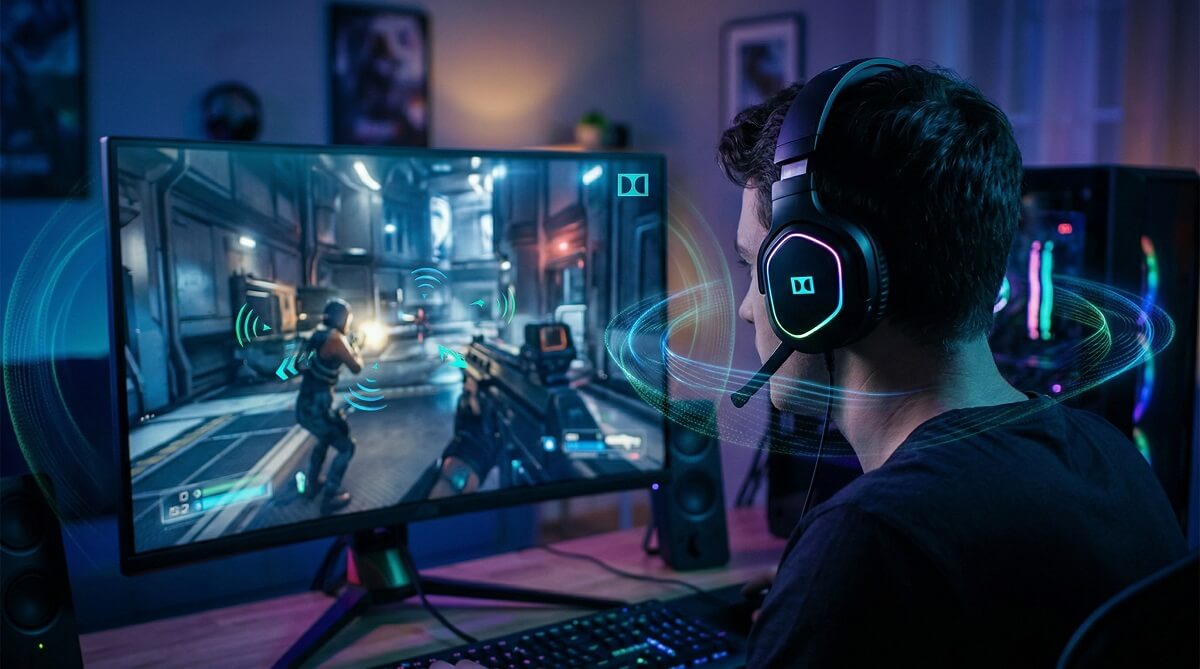
Short answer: yes, Dolby Access is good for gaming — particularly if you play on a Windows PC or Xbox with headphones. The spatial audio it delivers helps you hear directional cues more clearly, which matters most in FPS and tactical games. That said, there’s a detail most articles bury: the Dolby Access app itself is free, but the feature you actually want — Dolby Atmos for Headphones — costs $14.99 as a one-time purchase inside the app (as of March 2026; check the Microsoft Store listing for current pricing). Before you spend anything, you get a 7-day free trial — so there’s no reason not to test it with your own headset first.
Dolby Atmos for Headphones works with any stereo headset. You don’t need special hardware. It’s a software layer that processes game audio and maps it across a virtual 3D space around your head. For games that natively support Dolby Atmos — titles like Cyberpunk 2077, Halo Infinite, Call of Duty (from Modern Warfare 2019 onward), and Forza Horizon 5 — the effect is noticeably more immersive than standard stereo. For games without native support, results are still decent but more variable.
If you’re comparing it to the free alternative (Windows Sonic) or the competing paid option (DTS Sound Unbound), Dolby Atmos holds its own. The $14.99 one-time fee is reasonable for anyone who games regularly on supported platforms. If you’re mostly a casual player or you’re on PlayStation, Dolby Access isn’t relevant to you — more on that below.
Who Should (and Shouldn’t) Use Dolby Access for Gaming
✅ Best For
- PC gamers on Windows 10 or Windows 11 using headphones
- Xbox Series X/S and Xbox One players who game with a headset
- FPS and tactical shooter fans — the directional audio boost is real in games like Halo Infinite and Call of Duty
- Open-world players who want a richer environmental soundscape in games like Cyberpunk 2077
- Anyone who wants to try spatial audio risk-free before committing (7-day trial)
❌ Skip If
- You play exclusively on PlayStation — Dolby Access isn’t available on PS4 or PS5 (Sony uses its own Tempest 3D Audio engine)
- You’re on Linux or SteamOS — not supported
- You game on speakers rather than headphones — you’d need a separate Dolby Atmos setup for that
- You already use a headset with proprietary surround sound that conflicts with Windows spatial audio
- You prefer pure unprocessed stereo for competitive play and find any audio processing distracting
What Is Dolby Access, and What Does It Actually Do?
is a free app available on the Microsoft Store for Windows and Xbox. It’s the gateway to two Dolby technologies: Dolby Vision (for visual HDR on supported displays) and Dolby Atmos (for audio). For gaming purposes, the relevant feature is Dolby Atmos — specifically the Dolby Atmos for Headphones mode.
The Free App vs. the Paid Feature
Here’s where it gets slightly confusing. Downloading Dolby Access costs nothing. But once you’re inside the app, enabling Dolby Atmos for Headphones requires a separate one-time payment of $14.99 (as of March 2026). You can try it free for 7 days before deciding. Some partner headsets — including select models from SteelSeries, Astro, and Corsair — come with Dolby Atmos for Headphones already activated, so check your headset’s included content before purchasing.
What Dolby Atmos for Headphones Actually Does
Standard stereo headphones give you left and right channels. Dolby Atmos for Headphones uses digital signal processing (DSP) to simulate a full sphere of sound around your head — left, right, front, behind, above, and below. It does this without any special hardware; the processing happens in software on your PC or Xbox. The result is spatial audio: you can hear sounds from specific positions in 3D space, not just panned left or right.
This differs from marketing claims like “360-degree surround” that come with cheaper gaming headsets. Those typically cram multiple tiny drivers into a cup to fake the effect. Dolby Atmos for Headphones is a proper object-based audio format — each sound in the game has a position in 3D space, and the software maps that position relative to your ears. , we cover headsets and setups across all budgets.
Does Dolby Atmos Actually Make a Difference in Games?
FPS and Competitive Games
This is where Dolby Atmos earns its keep. In first-person shooters and tactical games, knowing where sounds come from can decide matches. When you hear footsteps, you need to know if they’re above you, coming from your left flank, or approaching from behind — not just “somewhere to the left.” Testing referenced by the Headphonesty community has shown that Dolby Atmos for Headphones improves players’ ability to pinpoint enemy positions compared to standard stereo. It’s not magic, but the difference is noticeable enough to be meaningful in competitive sessions.
Games with native Dolby Atmos audio tracks — Halo Infinite, Call of Duty: Modern Warfare series, Valorant (via Windows spatial audio passthrough) — benefit the most. The audio engine sends object-based position data to Dolby’s processing layer, so the spatial rendering is accurate rather than approximated.
Open-World and Story-Driven Games
The difference in open-world titles is less about winning and more about atmosphere. Cyberpunk 2077 with Dolby Atmos feels genuinely different from stereo — rain sounds fall around you, distant city noise has depth, and ambient audio wraps more naturally. The same holds for Alan Wake 2, Dragon’s Dogma 2, Dying Light 2, and similar titles with rich environmental soundscapes.
These games won’t play better with Dolby Atmos, but they’ll feel more engrossing. That’s a fair trade for $14.99 if you spend hours in atmospheric single-player games.
Racing and Sports Games
Racing titles like Forza Horizon 5 and Forza Motorsport both support Dolby Atmos natively on Xbox. Engine audio, crowd noise, and environmental sounds gain positioning that makes driving feel more physical. The Forza community on Xbox Series X has noted audio improvement after Dolby’s implementation was stabilized on the platform. It’s not as stark a benefit as in FPS games, but it adds to the experience.
Dolby Atmos vs. Windows Sonic vs. DTS Sound Unbound
On Windows and Xbox, you have three spatial audio options. Here’s how they stack up:
| Feature | Dolby Atmos for Headphones | Windows Sonic | DTS Sound Unbound |
|---|---|---|---|
| Cost | $14.99 (one-time) | Free (built into Windows) | Check Microsoft Store for current pricing |
| Platform | Windows 10/11 + Xbox | Windows 10/11 + Xbox | Windows 11 + Xbox |
| Works with any headset | Yes | Yes | Yes (500+ tuned profiles available) |
| Free trial | 7 days | Always free | Yes (check app) |
| Native game support | 100+ Xbox titles, major PC titles | All games (via Windows API) | Major titles including Halo Infinite, Cyberpunk 2077 |
| Audio character | Warmer, slightly bass-forward | Narrower soundstage, can sound thin | Flatter EQ, more neutral |
Windows Sonic — The Free Starting Point
Windows Sonic is built directly into Windows and Xbox at no charge. If you’ve never tried spatial audio before, turn it on and spend a few sessions with it. It improves positional awareness over stereo in most games. The downside: some users find its soundstage narrower and the audio processing more aggressive, with a tendency toward distortion at certain frequencies. It’s a reasonable free option, not a premium one.
DTS Sound Unbound — The Flat-EQ Alternative
DTS Sound Unbound (the updated successor to DTS:X Ultra) uses DTS Headphone:X technology with a database of over 500 tuned headphone profiles, which means it can tailor the processing to your specific headset if it’s in the library. Users who prefer a more neutral, accurate sound signature often prefer DTS over Dolby’s warmer profile. After DTS updated their app to use Windows 11’s updated spatial audio APIs in recent updates, some community comparisons rate it as comparable to — or better than — Dolby Atmos for gaming specifically. It’s worth trialing both if you’re undecided.
Dolby Atmos — The Premium Balanced Option
Dolby Atmos for Headphones has the widest native game support and the most polished implementation for the Xbox ecosystem. Its audio character trends warmer and slightly bass-heavy compared to DTS, which some gamers prefer and others don’t. For most people who game on PC and Xbox, it’s the safest recommendation — especially given the 7-day trial removes the financial risk.
How to Set Up Dolby Access on Windows PC
- Download Dolby Access from the Microsoft Store (free)
- Open the app and start the 7-day free trial of Dolby Atmos for Headphones (no credit card required to trial — check current terms in app)
- Go to Windows Sound Settings → right-click your speaker icon in the taskbar → Open Sound Settings → click your headset → Device properties → Spatial sound
- Select “Dolby Atmos for Headphones” from the Spatial sound dropdown
- Return to the Dolby Access app to adjust personalization (bass, volume leveling, dialogue enhancement) to your preference
- Launch a supported game — Halo Infinite, Cyberpunk 2077, or any Dolby Atmos title — and test the difference
The whole setup takes under five minutes. If you don’t notice a difference right away, try a game with clear directional audio like a shooter or a game with rich ambient sound. Blind A/B comparisons in stereo vs. Dolby Atmos mode are the fastest way to decide if it’s worth keeping.
How to Set Up Dolby Access on Xbox Series X/S
- Download Dolby Access from the Xbox Store (free — search “Dolby Access” in the store)
- Open the Dolby Access app and activate your 7-day trial or enter a product key if your headset came with one
- Go to Xbox Settings → General → Volume & audio output
- Under Headset format, select Dolby Atmos for Headphones
- Plug in your headset to the controller’s 3.5mm jack (or use a USB headset) and start gaming
The Xbox implementation is straightforward. Note that if you connect via HDMI to a Dolby Atmos-certified TV or soundbar, you don’t need the headphone activation — the TV/soundbar handles decoding. for more on building an optimal Xbox audio setup.
Headsets and Devices That Work with Dolby Atmos
Any Headset Works — That’s the Point
One of Dolby Atmos for Headphones’ main advantages is that it’s not locked to proprietary hardware. Any stereo headset connected via 3.5mm, USB, or Bluetooth will work with the software. You don’t need a $200 gaming headset to use it. A decent pair of over-ear headphones or even standard earbuds will process Dolby Atmos — though headsets with better driver quality will reproduce the spatial cues more accurately.
Partner Headsets with Built-In Activation
Some headsets come with a Dolby Atmos for Headphones activation code bundled in the box, saving you the $14.99 purchase. Notable models confirmed to support Dolby Atmos (check current product listings for bundled activation status):
- SteelSeries Arctis Nova Pro Wireless (Xbox edition)
- Astro A50 X
- Corsair Virtuoso MAX Wireless
- Select SteelSeries Arctis models ( for current picks)
SteelSeries has confirmed that all their headsets support Dolby Atmos for Headphones via the software. Whether the activation is bundled or requires a separate purchase varies by model — check the box or product page before buying.
For TV and Soundbar Setups
If you game on a Dolby Atmos-certified TV or soundbar via HDMI, the Dolby Access app is still the gateway, but the Dolby Atmos for Headphones license is not what you need. Your TV or soundbar decodes the Atmos signal directly. This setup typically sounds better than the headphone virtualization for immersive gaming, but it’s less practical for positional audio precision in competitive play.
Frequently Asked Questions
Is Dolby Access free?
The Dolby Access app is free to download from the Microsoft Store on Windows and Xbox. The feature inside it — Dolby Atmos for Headphones — costs $14.99 as a one-time purchase (as of March 2026). A 7-day free trial lets you test it before committing.
How much does Dolby Atmos for Headphones cost?
$14.99 USD as a one-time in-app purchase inside the Dolby Access app (March 2026 pricing). This is a permanent license — not a subscription. Check the Microsoft Store listing for current pricing, as regional prices may vary.
Does Dolby Access work with any headphones?
Yes. Dolby Atmos for Headphones is a software feature — it works with any stereo headset connected via 3.5mm, USB, or Bluetooth. No proprietary hardware is required. Better headphones will reproduce the spatial audio more accurately, but even basic earbuds will receive the processing.
Is Dolby Atmos better than Windows Sonic for gaming?
Generally, yes — though Windows Sonic is free and still noticeably better than plain stereo. Dolby Atmos for Headphones delivers a warmer, more polished soundstage with wider native game support (100+ Xbox titles). Windows Sonic is the right choice if you want to try spatial audio without spending anything. If you game regularly, the $14.99 upgrade to Dolby Atmos is usually worth it.
Does Dolby Access work on PlayStation?
No. Dolby Access is a Microsoft Store application and is only available on Windows PC and Xbox. PlayStation 4 and PS5 use Sony’s own Tempest 3D Audio technology, which is built into the console and doesn’t support Dolby Atmos for Headphones.
Can I try Dolby Atmos for Headphones before buying?
Yes. The Dolby Access app includes a 7-day free trial of Dolby Atmos for Headphones. Download the app from the Microsoft Store, start the trial, enable it in Windows Sound Settings or Xbox audio settings, and spend a week gaming with it. If you don’t notice a worthwhile difference, don’t buy it.
Does Dolby Atmos help in competitive FPS games?
It can. Positional audio cues — hearing footsteps above you, shots from specific angles, enemies moving behind walls — are clearer with Dolby Atmos than standard stereo. Testing has shown players can more accurately locate in-game audio sources when using Dolby Atmos for Headphones. That said, some competitive players prefer disabling all audio processing for the most direct, uncolored sound. Try both and see what works for your playstyle.
What games support Dolby Atmos on PC and Xbox?
Over 100 Xbox titles support Dolby Atmos natively, including Cyberpunk 2077, Halo Infinite, the Call of Duty series (from Modern Warfare 2019 onward), Forza Horizon 5, Forza Motorsport, Alan Wake 2, Dragon’s Dogma 2, and Dying Light 2. PCGamingWiki maintains a full list for PC titles. Games without native support still benefit from Dolby’s Windows Spatial Sound API processing, though results are less precise.
The simplest move: download Dolby Access from the Microsoft Store and run the 7-day trial. You’ll know within a session or two whether spatial audio is worth it for the way you play. for headset picks, setup tips, and audio comparisons.
