


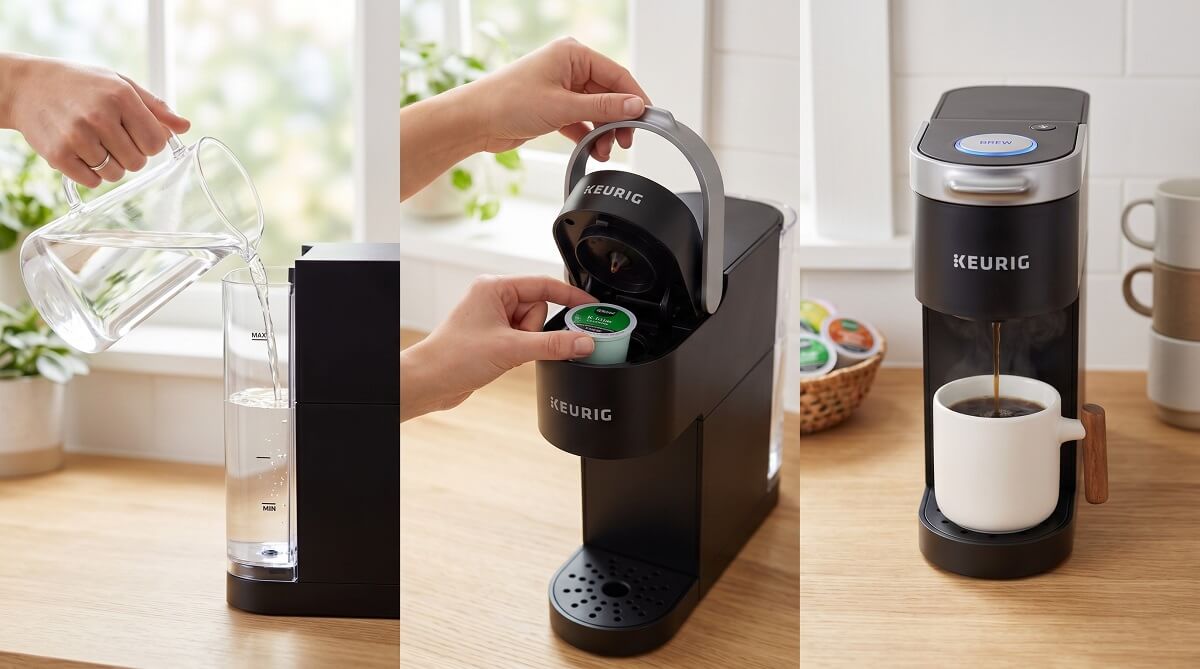
The Keurig K-Mini is about as simple as a coffee maker gets. According to Keurig’s official specs, it measures just 4.5 inches wide, holds no standing water reservoir, and brews a single cup — anywhere from 6 to 12 ounces — in under 3 minutes. You pour in fresh water, drop in a K-Cup pod, press one button, and you’re done.
One feature that sets it apart from bigger Keurig models: because there’s no built-in reservoir, you add water directly to the well for every cup. That means no stale water sitting in the machine for days, which is great for anyone who uses it occasionally or wants to store it away seasonally. The flip side is that back-to-back cups require a refill each time.
This guide covers everything from first-time setup and daily brewing to brew strength tips, monthly cleaning, descaling, and a troubleshooting table for the most common issues. Whether you just pulled it out of the box or you’ve had it for a while and want to get more out of it, you’ll find what you need below.
Who Should (and Shouldn’t) Get a Keurig K-Mini
✅ Best For
- First-time coffee maker owners who want something with no learning curve
- College dorm rooms, small apartments, or offices with limited counter space
- Anyone who brews one cup at a time and doesn’t want to deal with leftover coffee
- Seasonal or occasional users — no standing water means no concerns about storage
❌ Skip If
- You brew multiple cups back-to-back and don’t want to refill the water well each time
- You want programmable features, an auto-on timer, or a strength dial on the base model
- You’re serving a whole household — consider a full-size Keurig or a drip brewer instead
If you want the strong brew option, a pod storage compartment, and a removable reservoir, the K-Mini Plus (around $99.99 MSRP) is worth the extra spend. See the for a side-by-side breakdown.
What Comes in the Box
When you open a new K-Mini, you’ll find the brewer unit, a removable drip tray, and a quick-start guide. The power cord is tucked into a storage slot on the base of the machine — pull it out and plug it in before first use. No K-Cup pods are included, so have some on hand before you start.
If you want to skip the pods and use your own ground coffee, the works with the K-Mini. It’s sold separately and lets you fill it with any ground coffee you prefer.
Setting Up Your Keurig K-Mini for the First Time
Step 1 — Unbox and Inspect
Remove all packaging tape and foam inserts from the brewer. Pull the power cord from the storage slot on the base, plug it into a standard outlet, and press the power button. The indicator light should illuminate to confirm the unit is on.
Step 2 — Run the Cleansing Brew (Required Once)
Before your first cup of coffee, the K-Mini needs one cleansing brew — a full cycle with just water and no K-Cup — to flush any manufacturing residue. It only takes a few minutes and you only have to do it once.
- Fill a mug with water and pour it into the water well (aim for between the MIN and MAX fill lines)
- Place an empty mug on the drip tray — do not insert a K-Cup pod
- Lift and lower the handle
- Press the brew button — the indicator will pulse while the water heats up
- After about 2 minutes, water will start flowing into the mug; once it stops, discard the water
That’s it. Your machine is ready to brew real coffee.
Water note: Don’t use distilled water in your K-Mini. Distilled water can draw trace metals from the internal components over time. Tap, filtered, or bottled water all work fine.
How to Brew Coffee with the Keurig K-Mini
Step-by-Step for Every Cup
Once the initial cleansing brew is done, making coffee is a short, repeatable process. Here’s the full sequence:
- Fill your mug with the amount of water you want to brew (6, 8, 10, or 12 oz)
- Lift the water well lid and pour the water from your mug into the well — check the fill level markers to confirm you’re in the MIN-to-MAX range
- Lift the brewer handle — you’ll hear a soft click as water drains into the heating element
- Drop a K-Cup pod into the pod holder
- Lower the handle firmly — this punctures the top and bottom of the pod
- Place your mug on the drip tray (remove the tray if you’re using a tall travel mug)
- Press the brew button; the indicator glows solid, then pulses while heating
- In under 3 minutes, per Keurig’s specifications, coffee starts flowing into your cup
Tip: For a stronger cup, brew at 6 oz. For something lighter and larger, go with 10 or 12 oz. The pod doesn’t change — only the amount of water does.
Auto Shut-Off and Travel Mugs
The K-Mini powers down automatically 90 seconds after your last brew. You don’t need to turn it off manually, though you can press the power button if you prefer not to wait. For tall travel mugs, remove the drip tray — the brewer accommodates mugs up to 7.0 inches tall with the tray out.
Can You Use Any K-Cup?
Yes. The K-Mini works with any standard K-Cup compatible pod, not just Keurig-branded ones. The unit punctures the pod’s foil top during brewing, so never open a K-Cup before inserting it. After brewing, leave the pod holder lid open to air-dry the assembly.
K-Mini vs. K-Mini Plus: Which One Should You Get?
Both brewers are nearly identical in size and mechanics — same 6–12 oz range, same compact footprint, same 90-second auto-off. The K-Mini Plus adds three meaningful upgrades worth knowing about before you buy. If you’re still deciding between a pod machine and other options, our covers the full landscape.
| Feature | K-Mini | K-Mini Plus |
|---|---|---|
| Brew sizes | 6–12 oz | 6–12 oz |
| Brew time | Under 3 min | Under 3 min |
| Dimensions | 12.1″H × 4.5″W × 11.3″D | 12.1″H × 4.5″W × 11.3″D |
| Weight | 4.6 lbs | 4.6 lbs |
| Strong brew setting | No | Yes |
| Pod storage | No | Yes (9 pods) |
| Removable reservoir | Fixed single-cup well | Removable reservoir |
| Travel mug clearance | 7.0″ (tray removed) | 7.0″ (tray removed) |
| Auto shut-off | 90 seconds | 90 seconds |
| MSRP | ~$79.99 (check current price) | ~$99.99 (check current price) |
If you want bolder coffee or frequently skip buying pods until you run out, the K-Mini Plus is the more practical pick. For pure simplicity and the lowest price, the base K-Mini does everything you need.
Check current prices for the K-Mini on Amazon or the K-Mini Plus on Amazon.
Keeping Your K-Mini in Good Shape
The K-Mini is low-maintenance relative to most coffee makers. Three things cover almost everything: a weekly wipe-down, a monthly parts clean, and descaling every few months.
Weekly: Wipe the Exterior
A damp cloth on the exterior and around the pod holder area after each brew session keeps coffee grounds and drips from building up. Takes about 30 seconds.
Monthly: Clean the Removable Parts
Once a month, give the machine a more thorough clean:
- Unplug the machine first
- Remove the drip tray and pod holder assembly
- Wash both with warm, soapy water; rinse and dry with a lint-free cloth
- Use a straightened paperclip to clear any coffee grounds from the entry and exit needles — the exit needle is sharp, so handle it carefully
- Wipe the water tank valve connection with a damp cloth
- Reassemble, then run one cleansing brew (water only, no pod) to flush any residue
Every 3–6 Months: Descale
Mineral deposits from tap water gradually build up inside the heating element. You’ll notice slower brew times or a slightly off taste when it’s time to descale. According to Tom’s Guide, most users should descale every 3–6 months — monthly to every 3 months if you’re in a hard-water area.
You have two options for descaling solution:
- Keurig Descaling Solution — the official product, currently $8.99 for a 14 oz bottle at Target (as of March 2026). Compatible with all K-Mini models. Using the manufacturer’s solution keeps your warranty intact.
- Distilled white vinegar — a DIY alternative. Mix one part white vinegar with two parts water.
Descaling Process (K-Mini-Specific):
- Power off the brewer and remove any K-Cup pod
- Fill the water well with your descaling solution mixed with water (to the MAX line)
- Place a large mug on the drip tray and run a full brew cycle — discard the liquid
- Refill with the same solution, start a brew cycle, then power off the machine after the first few drops come out — let it soak for at least 1 hour (this is the key step for loosening stubborn mineral buildup, per iFixit’s K-Mini descaling guide)
- After soaking, power on and run the remaining solution through
- Refill with fresh water and run 4–6 rinse cycles until no vinegar smell or aftertaste remains
Looking for a complete cleaning walkthrough that covers other coffee maker types too? Our goes deeper on the vinegar method across different machines.
Troubleshooting Common K-Mini Problems
| Problem | Likely Cause | Fix |
|---|---|---|
| Machine won’t brew | Water below MIN line | Add water until it’s between MIN and MAX markers |
| Small or watery cup | Water overfilled or wrong size selected | Use 6–8 oz for a full, strong cup; stay within the fill lines |
| Water overflow into drip tray | Excess water in the well | Don’t exceed 12 oz; the fill level markers are your guide |
| Slow brew or odd taste | Mineral buildup from hard water | Run a descaling cycle |
| Coffee grounds in your cup | Clogged exit needle | Clean the needle with a straightened paperclip |
| Machine won’t turn on | Power cord not fully seated | Check that the cord is fully pulled from the base storage slot and plugged in |
| Weak coffee every time | Brewing at 10–12 oz with a light-roast pod | Switch to 6–8 oz setting, or try a darker roast K-Cup |
For more involved issues, or visit Keurig’s official support page for model-specific error codes and warranty service options.
Frequently Asked Questions
Does the Keurig K-Mini have a water reservoir?
No. Unlike larger Keurig models, the K-Mini has no built-in reservoir. You pour fresh water directly into the water well for each cup you brew — up to 12 oz at a time. This is actually a practical advantage if you use the machine occasionally or store it seasonally, since there’s no standing water to go stale or deal with during storage.
Can you use any K-Cup in a Keurig Mini?
Yes — the K-Mini is compatible with any standard K-Cup pod, including third-party brands. You’re not limited to Keurig-licensed pods. The machine handles the puncturing automatically, so don’t open or peel the foil top before inserting.
How do I make stronger coffee with a K-Mini?
Use less water. Brewing at 6 oz produces a more concentrated, bolder cup than brewing at 12 oz with the same pod. If you want a built-in Strong Brew button, the K-Mini Plus offers that as an upgrade.
Can I use distilled water in a Keurig Mini?
No. Keurig’s guidance is to avoid distilled water because it can draw trace metals from internal parts over time. Tap, filtered, or bottled water are all fine alternatives.
How long does the K-Mini take to brew?
Per Keurig’s official specifications, the K-Mini brews a cup in under 3 minutes. Most users find the first brew of the day takes the full time to heat up; subsequent cups (if you’re refilling quickly) tend to go a bit faster since the machine retains some heat.
How often should I descale my Keurig K-Mini?
Every 3–6 months for most users. If you have hard water — common across much of the Midwest and Southwest — you may need to descale monthly to every 3 months. Signs it’s time: slower brew speed, weaker coffee, or a slightly off taste.
Can you use a reusable filter in the K-Mini?
Yes. The My K-Cup Universal Reusable Coffee Filter fits the K-Mini. Fill it with any ground coffee you want, pop it in like a regular K-Cup, and brew as usual. It’s a cost-effective option if you have a favorite ground coffee and want to skip the pod markup.
How do I clean the needles on a Keurig Mini?
Straighten a paperclip and carefully insert it into the entry needle (on the handle lid) and the exit needle (inside the pod holder) to dislodge any stuck coffee grounds. The exit needle is quite sharp, so handle it slowly and carefully. After clearing both needles, run a cleansing brew cycle with just water to flush the loosened particles.
Ready to pick one up or compare current deals? Check the latest pricing on the K-Mini on Amazon and the K-Mini Plus on Amazon. You can also browse on ChubbytIps for other appliance setup walkthroughs.
